HARDWARE: Bond multiple internet connections

Monday, September 1, 2014

Carrier grade capabilities coming down to high end user price levels.

It’s easily now in the SMB range. Won’t be long before it’s in SOHO.

Bond 4g, 3g, cable / fios, cell phone bandwidth together.

Never dreamed of in the old days.

Wow.

*** begin quote ***

Introducing SimplyBonding from 3Gstore
3Gstore is thrilled to announce our new hosting service that allows you to bond multiple internet connections with minimal equipment and easy setup: SimplyBonding. Unlike failover or load balancing, a bonded connection takes multiple internet connections and COMBINES them. The resulting connection is both faster and more reliable: if you have 3 internet connections that are bonded together and one goes down, your connected devices and apps will never know there was a failure – even apps that maintain persistent connections!

Video: SimplyBonding Unbreakable Internet

What is bonding?

When businesses need a more reliable internet connection, they often turn to Failover or Load Balancing, features familiar to many users and available on a variety of consumer and enterprise grade routers. Failover routers have the ability to switch over to a secondary connection when one internet connection goes down, but you lose the connection during the switchover (and again when the primary connection comes up again and it switches back), and failover doesn’t help with connection speeds. Load Balancing routers split the traffic load amongst multiple internet connections, but they do not aid in reliability or increase speed. Failover and load balancing are useful features, but they are NOT the same as bonding.
A bonded connection takes multiple internet connections and COMBINES them to create a faster and more reliable stream. The concept of bonding (AKA aggregating) internet connections has been around for years, but it has historically been prohibitively expensive and very complicated to deploy and manage. SimplyBonding solves both of those problems!

*** end quote ***

# – # – # – # – #   


HARDWARE: Turn off the Caps Lock key

Monday, August 11, 2014

http://www.cultofmac.com/246792/stop-yelling-turn-off-the-caps-lock-key-on-your-mac-os-x-tips/

Stop Yelling – Turn Off The Caps Lock Key On Your Mac [OS X Tips]

Rob LeFebvre (6:00 am PDT, Sep 23rd 2013)

# – # – # – # – #   

Gal Pal’s Mom, on a Windoze implementation, for the n-th time, had the caps lock on while typing her password for AOL.

(Yeah, I know, who knew AOL was still business.)

So, Gal Pal asked me how to permanently disable it.

Easy peasy.

Then I go to think of all the times I inadvertently did the same thing.

So I found out how to turn it off on the Mac OS X.

Easier!

Done.

# – # – # – # – #   


CHROMEBOX: Asus Chromebox $169.99

Thursday, June 19, 2014

http://www.chromestory.com/2014/06/deal-alert-asus-chromebox-169-99/

Deal Alert – Buy Asus Chromebox for $169.99 from Amazon
Dinsan Francis 19/06/2014

Amazon has great discounts on Asus Chromeboxes. The base model is now selling for $169.99, down from the original $179. This is a 5% saving around $9. The second model with 4GB RAM and i3 processor also has a great offer. It is now $379.99, down from $399.

# – # – # – # – #   

That’s unbelievably cheap!

# – # – # – # – #   


HARDWARE: Chromebook Central Google Product Forum

Wednesday, June 4, 2014

Hello, Chromies!

Our new Chromebook Central Google Product Forum is officially live and awaiting your posts! You can access the new forum here (https://productforums.google.com/forum/#!forum/chromebook-central).

To get started, why don’t you stop by this thread and discuss your favorite extensions, apps, and plugins with other Chromies.

Please note that Chromecast has moved to its own forum. You can access the new Chromecast forum here (https://productforums.google.com/forum/#!forum/chromecast).

We will now be archiving the posts on this community forum, meaning you will still be able to search and read the archived posts, though this former site will no longer feature active posts (learn more about the reasons behind our move here.) Be sure to share the new forums with your fellow Chromies!

Thanks to all of you for the contributions you’ve made to the Chromebook Central community. We’ll see you over in the new Chromebook Central and Chromecast forums!

– Andrea
Chromebook Central Community Manager

# – # – # – # – #   


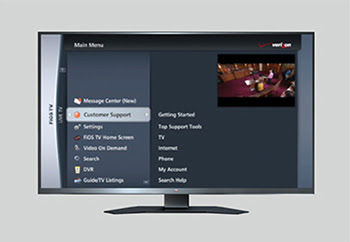
HARDWARE: FIOS required update

Sunday, January 19, 2014


Dear Valued Verizon Customer,

We continually strive to improve your 
FiOS® TV service and are making enhancements to create an even simpler and better experience for you. These changes will occur on Tuesday, January 21, 2014,and will cause your Set Top Box to automatically reboot, which means turning off and on. If you experience any issues with your Set Top Box as a result of this automatic reboot, please unplug your Set Top Box and plug it back in. This should resolve most issues.

Some of these enhancements include:

  TV
       
 
Adding more Closed Captioning capabilities


Simplifing your FiOS TV menu by:

  • Consolidating our Customer Support section, making it easier for you to use
  • Renaming your DVR Settings to Configure & Upgrade
  • Allowing you to access all of your TV listings using the Guide View header in Guide/TV Listings
 
Your Parental Controls will also be enhanced to enable you to temporarily turn them off for a period of 4 hours. This new capability will allow you to turn your Parental Controls off to enjoy an evening of TV watching without having to remember to turn them back on later. They will automatically resume after the 4 hour period. To use this functionality, press the Options button on your FiOS® TV Remote Control while watching live TV and select Parental Controls.
       

Thank you for choosing Verizon. We hope these new enhancements help you enjoy your FiOS TV service for many years to come.

Sincerely,

Your Verizon Team

# – # – #  

I don’t see anything that I need. So why do I have to upgrade? Time to rethink the paradigms and memes involved.

# – # – # – # – #  2014-Jan-19 @ 11:18  


HARDWARE: Changning Time zones

Wednesday, November 20, 2013

Argh!

Why CAN’T we all use GMT?

The company issued blackberry doesn’t know time zones.

Apple does.

Amusingly the IPAD with only wifi capability know what time it is here.

Even my anchient Verizon cell phone knows.

And why is my body sit on EDST?

# – # – # – # – #   


HARDWARE: No signal on plane

Sunday, November 17, 2013

Most interesting on today’s flight.

No signal on the iPhone and no signal on the mifi while in the air.

That surprised me.

With all the fluff about cell phones on planes, they are not much use without connectivity.

NO email; NO texting; NO voice.

Hmmm, have to rethink everything.

# – # – # – # – #  2013-Nov-17 @ 09:26  


HARDWARE: Changing my opinions …

Wednesday, October 30, 2013

This last upgrade to Mac OS X Mavericks appears to break stuff and change things.

Not for the better.

So, Apple has disappointed me. 

I now think they are in the same class as IOS7, Windoze, Linux, and Chromebook.

Each have their own advantages, disadvantages, and utility.

I really don’t know what I’m going to do.

Unfortunately, I just want to use the stuff to produce stuff. I don’t want to alpha test unless I volunteer.

Argh!

# – # – # – # – #   


HARDWARE: CFB on FOX on Channel 5 TV poor video quality

Saturday, October 26, 2013

CFB on FOX on Channel 5 TV

The picture quality “stinks”!

I see jitter and very poor video quality.

(Not that anyone cares!)

# – # – # – # – #   


HARDWARE: Crony Capitalist Microsoft subtly restrains trade

Saturday, October 19, 2013

http://www.tomshardware.com/news/nvidia-linux-basemosaic-ubuntu-parity,24519.html

Nvidia Removed Linux Driver Feature Due to Windows
By Kevin ParrishOCTOBER 3, 2013 1:28 PM – Source: Softpedia 
The reason seems a little contradictory.

*** begin quote ***

Softpedia points to a Nvidia Developer Zone forum post revealing that the company has removed a specific Linux feature as of the v310 drivers due to the Windows platform. A BaseMosaic user on Ubuntu 12.04 noticed a change in the number of displays that can be used simultaneously after upgrading from the v295 drivers to v310.

*** and ***

Yet in v295, the Ubuntu user was able to get four monitors up and running. So why was BaseMosaic altered to support only three monitors instead? Nvidia explains. “For feature parity between Windows and Linux we set BaseMosaic to 3 screens,” said “Sandpit” of Nvidia’s Linux team.

What’s interesting here is that Nvidia’s proprietary Windows driver has features not found in the Linux drivers, but the company will remove specific Linux-only features for “parity.” The comment indicates that the three-screen limit has nothing to do with a degradation of quality when using four screens, but a possible Microsoft request/demand.

Nvidia’s driver documentation states that BaseMosaic can be used to extend a single X screen transparently across all of the available display outputs on each GPU.

“This is like SLI Mosaic mode except that it does not require a video bridge connected to the graphics cards,” the notes read. “Due to this Base Mosaic does not guarantee there will be no tearing between the display boundaries. Base Mosaic is supported on all the configurations supported by SLI Mosaic Mode. It is also supported on Quadro FX 380, Quadro FX 580 and all G80 or higher non-mobile NVS cards.”

It will be interesting to see if Nvidia returns four-monitor support back to its Linux drivers, given that the reason for removing the feature seems a little contradictory.

*** end quote ***

Yeah, dumbing down the free market competitor is fair. But don’t do the something equivalent to the big guy.

Nvidia is taking a gamble.

Hope they pay for that decision.

Personally, I have placed them on my “Toshiba” list. Technology I will never buy. (Toshiba sold the US Navy sub quiet propeller design to Red China.) 

Like my “Jane Fonda” list, I have a very LONG memory.

Hope you all do too!

# – # – # – # – #   


HARDWARE: LIVESCRIBE (not recommended)

Friday, September 27, 2013

http://www.livescribe.com/en-us/

Bought one on a lark.

Some minor issues, but worked through them. 

Even liked it. 

Can think of some stuff that could be better.

BUT now I have come up with the KILLER negative.

I lost the darn thing.

OK. It’s a $200 gadget. But it was “useful”.

So I ask the question, “if I buy a new one, can I link it to my old stuff.”

Answer, <cue Jeopardy theme>, …

… NO!

Are u kidding me?

There’s an obvious “use” case!

Oh well, let me slap a big NOTRECOMMENDED on this one.

# – # – # – # – #   


HARDWARE: Misplaced my LIVESCRIBE pen!

Wednesday, September 11, 2013

All gadgets should have a find me feature.

Argh!

# – # – # – # – #   


HARDWARE: VERIZON FIOS reboot

Sunday, August 25, 2013

At 1215, the beast dropped power are rebooted.

Lost the inet for a minute, tv took much longer to recover.

# – # – # – # – #  2013-Aug-25 @ 12:20  


HARDWARE: Kindle Paperwhite

Saturday, August 17, 2013

http://www.amazon.com/gp/product/B007OZNZG0/ref=as_li_ss_tl?ie=UTF8&camp=1789&creative=390957&creativeASIN=B007OZNZG0&linkCode=as2&tag=reifaclif-20

Kindle Paperwhite
Wi-Fi, Paperwhite Display, Higher Resolution, Higher Contrast, Built-in Light

# – # – # – # – #   

OK, I relented and bought one. The IPADs, Mac reading app, and such are just too “heavy”.

I like it …

… BUT, (and there is always a BIG butt), …

It needs some UI (User Interface) help with respect to Library Books.

It’s a PIA to get stuff off the Kindle that has expired. 

It also doesn’t (easily if at all) differntiate between content I’ve borrowed and stuff I’ve bought.

Getting stuff emailed to it seems neat but width-wise doesn’t always fit.

More as I play with it.

“But choose wisely, for while the true Grail will bring you life, the false Grail will take it from you.” Grail Knight in Indiana Jones and the Last Crusade (1989) http://www.imdb.com/title/tt0097576/quotes

# – # – # – # – #   


HARDWARE: NEWTRENT POWERPAK+ NT135T

Saturday, July 6, 2013

http://www.amazon.com/New-Trent-Powerpak-NT135T-Incredible/dp/B009TCUPIC/ref=sr_1_4?ie=UTF8&qid=1372267456&sr=8-4&keywords=new+trent+power

New Trent PowerPak+, NT135T: (13500mAh) 2A/1A Dual USB Ports Portable Back Up External Battery Charger/Power Bank/Power Pack for Apple: iPad 4 / 3 / 2/ iPad mini, iPhone 5 / 4S / 4 /3GS, iPod Touch (all version); Samsung: Galaxy Note, S4 / S3 / S2, Galaxy Nexus ; Google: Nexus 10 / 7, HTC: ONE, One X, One S, Droid Incredible 4G; Nexus 4, LG: Optimus series; Blackberry: Z10, Torch, Tour; Motorola: Razr Maxx HD, Droid series; Nokia: Lumia 900 / 800 / 700, Sony: Xperia series, GoPro, and most 5V chargeable devices (Upgraded Version of the NT120T)
by New Trent

# – # – #  

It’s not intuitively obvious to use.

When it’s recharging something, it looks like nothing is happening.

You have to carry the original device cables with you.

It can only charge something that will take power from a USB. (No laptops!)

It doesn’t come with it’s own wall wart.

There are two usb output ports, but no external markings on which is the “bigger one” for IPADs and which is the “smaller one” for IPHONEs. (Would a colored dot add that much cost?)

As an OTTERBOX fan, I’d like covers on all the holes.

I’m using it, but my first experiences were 5 stars. 

# – # – # – # – #   


HARDWARE: AT&T MIFI Sierra Wireless “UNITE” problem

Saturday, May 11, 2013

New AT&T MIFI Sierra Wireless “UNITE”

MTTF about a week.

LOCKED in “shutting down”.

Not easy to get access to the battery. Pulled it and reinserted. Problem solved.

Then, I had to fix what I messed up floundering around.

I popped the SIM thinking that might break the “shutting down” lock. 

No dice. 

I guess when I put it back in I didn’t ram it home. Afraid of breaking it. 

So when it came back up, it whined about “no sim card”.

Easy fix. 

But strike one!

Argh!

# – # – # – # – #   


HARDWARE: It’s not the PC; it’s what can you do?

Saturday, April 20, 2013

http://www.zdnet.com/windows-its-over-7000013964/

*** begin quote ***

Yes, we are entering a post-PC world. Tablets and smartphones are becoming more important… to sales. PCs are no more going to go away than mainframes did. We’re still going to be using them in offices and homes for the foreseeable future. They let us easily do things that we need to do every day that we can’t easily do with a tablet or a phone.

*** end quote ***

I didn’t like Windoze when it started. I was a UNIX guy from AT&T. Then I saw the value of insulating Users for the operating system. 

Now, I just focus on getting work done?

# – # – # – # – #   


IPAD: can’t interact with contacts from gmail client

Sunday, March 17, 2013

Interesting.

From the natve GMAIL client on the IPAD, I can’t figure out how to save a contact.

Argh!

AND, it apparently doesn’t support the native IOS address book.

I am really getting tired of having to maintain addresses.

Plaxo had promise but all they wanted was to spam, charge, and interfere.

Maybe I should write an X500 directory service.

LinkedIn, Facebook, and everyone else has a different agenda.

I just want one synced address book!

Argh!

–30–


MACBOOKAIR: bought a new macbookair; lets call MCBA12

Tuesday, March 12, 2013

MacBook Air

11-inch, Mid 2012

Processor  1.7 GHz Intel Core i5

Memory  8 GB 1600 MHz DDR3

Graphics  Intel HD Graphics 4000 512 MB

Serial Number  C02JD02XF67K

Software  OS X 10.8 (12A269)


Let’s see how long this stays out of the obsolete file.

Brought up all my standard software

Tonight I’ll put together a manifest

Need to figure out the old MacBook Air’s software that was bought from the App Store; it didn’t come over. 

Scrivner is the only thing not over yet.

# – # – # – # – #   


HARDWARE: Watching ESPN3 on the big screen via Apple TV

Sunday, March 10, 2013

Watch the Manhattan College Jaspers on ESPM3 over the internet.

“Threw it” from the IPAD to the Apple TV which puts it on the TV.

Neat!

# – # – # – # – #  2013-Mar-10 @ 17:07  


HARDWARE: Personal hotspots?

Saturday, January 26, 2013

interesting. today, my whatever wanted to use the net from his itouch. so i turned on my hotspot on the ipad3. it was very slow. Sooooo, as a youngster, he moved on to other things.

I otoh was interested.

S i tried it with my itouch and it connected but gmail fails. and who knows what else. playing with it, but nothing productive.

wonder what it’s good for?

argh!

–30–


Ipad1: interesting problem

Saturday, November 24, 2012

I have never been happy with the “app store” concept. As usual, immoral, inefficient, and ineffective.

(this is, as readers of my blog will know, my standard meme for gripes. Stuff that’s immoral is always wrong. Ineffective is does it work. Inefficient is it easy and cheap.)

The “app store” concept is;

~ “immoral” in that it transfers control from the “buyer” to the “seller”

~ “ineffective” in that problems are insoluble; support is non-existent

~ “inefficient” in that it doesn’t work flawlessly

My current gripe is the GMAIL icon has disappeared from the front screen, but is running in the background. I get alert messages on new email.

Double clicking start does not show it in the task list.

A hard restart or a soft restart doesn’t recover it.

App store thinks it is installed.

Argh!

I have had problems with app store in the past that were never solved.

Argh squared!!

Loss of control of my device annoys me.

–30–


IPAD: IPAD3 no power

Tuesday, October 23, 2012

Into the Apple store tonight for service. Luckily under contact. Argh!

There re no lights on the cable or the wart to tell you that’s failed. 

Since it powered the IPad1, I pretty sure it’s the IPAD3.

And, tell me again how much better Apple hardware is?

# – # – # – # – #  2012-Oct-23 @ 14:58  


HARDWARE: Cox Cable Yankee game on IPAD

Friday, October 12, 2012

Watching the Yankee game live on Cox Cable. I have the cox app on the IPAD3. Interesting that the IPAD feed is at least a full minute behind the TV.

Go figure?

Hmm, “past posting” comes to mind.

LOL!

–30–


IPAD: Why isn’t the loyalty card app on the ipad?

Sunday, September 30, 2012

why isn’t the loyalty card app on the ipad?

seems strange to me.

#####


HARDWARE: Computers go toes up for many reasons

Monday, September 24, 2012

Every computer user should have a Carbonite or it’s equivalent. Computers go toes up for many reasons. After your platform becomes a smoking hole, or even just a hole when it gets stolen, what are YOU left with? Other than a “woe is me” tale. Astonishing to me is how few people have ANY backup strategy. No “Plan B”. Having paid tuition at that particular division of the University of Hard Knocks, I have no intention of revisiting the panic, dismay, and frustration of losing it ALL. (Not my fault. My employer had an enterprise backup plan. My platform was ‘overlooked’. Good bye 6 months of work. Some irreplaceable.) I’ve experienced this personally — two hard drives, one power supply, and one theft. with minimal impact. So, I am a firm worshiper at the “Church of Belt and Suspenders”! I’ve got layers of recovery. All set on automatic pilot. YMMV! But don’t expect sympathy from me when yours spinns, crashes, and burns.

p.s., I’m not shilling for Carbonite but for 60$/year, why not?

>Manhattan College ITS Blog: Saving Files
>itsblog.manhattan.edu

# – # – # – # – #