HARDWARE: Verizon sucks; FIOS NOTRECOMMENDED!

Saturday, March 19, 2011

It was a pleasure to assist you. Your chat session has ended. Thank You.

  Your chat ID number is 03191189238.

Chat Subject: FiOS Television (Other)

Your Question: Box is cycling every few minutes.

A Verizon Service Representative will be with you shortly. Thank you. (21:05:16)

<<< Ten minutes?>>>

21:15:01 Estimated wait time is 4 mins 42 secs. We apologize for the delay. You are next in the queue. A representative will be with you shortly.

Agent George has joined. (21:15:22)

George : Chat ID for this session is 03191189238. (21:15:22)

George(21:15:27): Thank you for using Verizon FiOS Technical Support. I apologize for any delays in reaching an agent today.

My name is George, for security purposes please post the name and address on the account as well as a good can be reached telephone number.

While I access your account and start running some diagnostic tests, please open a new browser window and type http://www.verizon.com/inhomeagent in the address bar and follow the prompts to download our new In Home Agent support tool, if you?ve not already done so.

Ferdinand Reinke(21:15:28): I don’t think there is much that can be done. The box is recycling every few minutes. And, my other box is running fine. Argh!

Ferdinand Reinke(21:16:11): I don’t want the inhome agent on my hardware.

George(21:16:36): please provide the information, i have asked for above please

Ferdinand Reinke(21:16:50): {Extraneous Deleted}

George(21:17:30): address on the account also

Ferdinand Reinke(21:17:45): {Extraneous Deleted}

George(21:18:20): ok

George(21:18:30): After our chat session is completed, I will send you a helpful email to the email address listed above reinke@reinke.cc

George(21:18:30): I’m sorry for any frustration this has caused, but I’d be glad to assist you with your issue today.

George(21:18:51): For security purposes can I please get you to confirm the account number, the last amount you paid, or the install date, please.

Ferdinand Reinke(21:19:07): I have no idea of that information.

George(21:19:42): i also need that information, i can wait also. if you need me to

Ferdinand Reinke(21:20:26):

{Extraneous Deleted}

George(21:21:01): thank you

George(21:21:27): also which box has the issue, the dvr or the sd box?

Ferdinand Reinke(21:21:51): the hd dvr box

George(21:22:22): is there any clicking or humming noise from the dvr/

Ferdinand Reinke(21:22:29): no

George(21:22:50): are you in front of it now?

George(21:22:55): i just flashed the programming on it

George(21:23:00): i need you to test it and see if it reboots

Ferdinand Reinke(21:23:03): sounds like the other tv has stopped playing

Ferdinand Reinke(21:23:19): press menu

George(21:23:34): i programmed both

George(21:23:40): go ahead and press menu

Ferdinand Reinke(21:23:44): done

George(21:23:54): picture?

Ferdinand Reinke(21:23:57): yes

George(21:24:03): let it play ok

Ferdinand Reinke(21:24:08): yup

Ferdinand Reinke(21:24:18): recylced

George(21:24:29): just did?

Ferdinand Reinke(21:24:32): yes

George(21:25:07): I’m going to mail out a replacement Set Top Box to you. It will arrive by UPS Next-Day Air (typically within 2-3 business days).

1. Once you receive the new Set Top Box, unplug the bad STB and power adapter and use the new STB and power adapter.

2. Then send back the bad Set Top Box using the supplied UPS shipping label and dropoff at the nearest UPS Store (www.theupsstore.com) or UPS Dropoff location.

Ferdinand Reinke(21:26:11): And I’m supposed to be happy about that. I’m without the TV service for 2-3 business days and I lose all the programs on the DVR?

George(21:26:31): yes you will lose all the recorded programs

Ferdinand Reinke(21:26:47): I know but I am NOT happy about that.

George(21:27:02): i am sorry, there is nothing we can do to make it not reboot

Ferdinand Reinke(21:27:36): OK let’s delete the DVR service completely. Just send me a replacement HD box.

George(21:28:06): can not do that, you have to talk to billing to do that

Ferdinand Reinke(21:28:26): This is the third DVR box that is being replaced.

George(21:28:31): if you want to swap to a lower priced box, they will have to do an ordr

George(21:28:36): i am sorry, but this isnt billing and orders

George(21:28:52): we do not, do orders to downgrade your box

George(21:29:02): i can only send you out a like for like unit

George(21:29:07): no downgrades

Ferdinand Reinke(21:29:43): Well you can credit the bill for at least four days out of service.

George(21:29:53): no

George(21:29:59): this isnt biling, this is repair

Ferdinand Reinke(21:30:04): NO>

George(21:30:24): repair, does not handle your bill or orders

Ferdinand Reinke(21:30:25): just shaking my head.

George(21:30:45): you understand, in repair we do not handle billing or orders

George(21:30:45): correct?

George(21:31:00): im going to send you out a replacement unit for your dvr

Ferdinand Reinke(21:31:00): I understand only to well.

George(21:31:05): since it keeps rebooting

George(21:31:11): it has been ordered

George(21:34:07): do you have any other questions, about the replacement unit

Ferdinand Reinke(21:34:32): NO!

George(21:35:08): I’m glad I could help. Chat Support is available everyday from 8am-9pm Central. Additional information on all 3 FiOS services can be found online at http://verizon.com/residentialhelp/.

Also, we have the Verizon In Home Agent that you can download at http://www.verizon.com/inhomeagent Thank you for choosing Verizon and have a great day.

Your session is now closed.

Thank you, have a nice day.

Your session is now closed.

Thank you, have a nice day.

# # # # #

This is not help.

This is the THIRD DVR!

VERIZON FIOS is NOTRECOMMENDED!

# # # # #


MACBOOKAIR: Another panic

Saturday, March 19, 2011

Argh!

# # # # #


MACBOOKAIR: Panic on sleep?

Saturday, March 19, 2011

This is getting absurd. Every time I come back to MCBA it fails to resume. Argh! In the ultimate act of desperation, I turned off all hibernation. WINDOZE is beginning to look better. Argh!

# # # # #


HARDWARE: VERIZON FIOS TV/DVR problems

Friday, March 18, 2011

2011-03-17 @ 2241

Several dropped signals and restarts early this evening. I just noticed that the DVR is working. “Cloud crap”? Argh!

Inet working fine. Don’t know about phone.

# # # # #

2011-03-18 @ 0845

Checking the DVR and the initial menu comes up. But then it recycles. Powering down the DVR.

Watched TV again. Get ready to touch the DVR and it recycles. No signal. “Press menu to watch”

(Argh!)

Ran the DVR trying to find the Jaspers on Saint Pat’s Parade. Recycles again.

@0854 recycles again.

(Argh!)

# # # # #


MACBOOKAIR: Another panic

Wednesday, March 16, 2011

Sitting all alone, it locked up! Argh!

Reminds me of windoze.

# # # # #


MACBOOKAIR: Refuses to resume from sleep

Wednesday, March 16, 2011

Again this morning. Another bare metal restore in our future?

Argh!

I’d rate MACBOOKAIR and OSX10.6.6 as no better than windoze!

# # # # #


MACBOOKAIR: Fails to resume from sleep

Monday, March 14, 2011

Argh! Twice yesterday. Need to be sure I never leave anything valuable unsaved.

# # # # #


MACBOOKAIR: Watch out for “cascading” update?

Friday, March 11, 2011

Applied an Mac update. It triggered an IPAD update. It triggered a reprocessing of all photos.

About 3 hours later, it’s bout 75% done.

I’ll be more careful about updates on the MACBOOKAIR.

I thought that MICROSOFT had the monopoly on bad updates.

Argh!

# # # # # posted 2011-03-11 09:42


MACBOOKAIR: HIgh CPU effectively locks up box

Sunday, March 6, 2011

ADDRESSBOOKSYNC appears to be the culprit.

Argh!

# # # # # posted 2011-03-06 08:05


MACBOOKAIR: Could Apple have a wifi software problem?

Friday, March 4, 2011

I don’t know. I don’t have the hardware, software, or expertise to debug the situation. But, when my MIFI and my WIFI, both have sucky performance. And, programs, that access the network, seem slow. And, I ‘always’ see “searching for networks”. Could it be that they have a significant problem with wifi at the operating system level?

Sigh!

How to figure that our?

# # # # # posted 2011-03-04 11:58


HARDWARE: Thermostat absurdity

Saturday, February 26, 2011

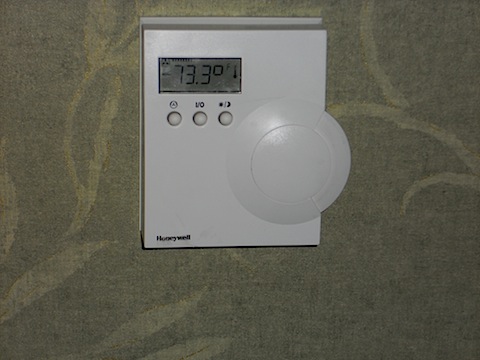
DSCN0021

OK, here’s a hospital room thermostat. It’s cold in the room. How do I make it warmer? Or, colder.

Those three buttons must DO something, I feel like I’ve been dropped into a future civilization. Or stuff changes, and I didn’t get the memo.

How about a big + and – sign?

Argh!

# # # # # posted 2011-02-26 03:28


MACBOOKAIR: AddressBookSync is taking 98% of the CPU?

Thursday, February 24, 2011

AddressBookSync is taking 98% of the CPU?

I have “sync” set to manual. What’s up with that?

# # # # # posted 2011-02-24 07:28


MACBOOKAIR: Out of space condition

Thursday, February 24, 2011

POSTBOX2 and CHROME running. Zero free space. Reboot. 7 Gig free. Argh!

# # # # # posted 2011-02-24 07:18


MACBOOKAIR: Fails to restart from sleep

Tuesday, February 15, 2011

Don’t think I lost anything. No obvious error message. Send report to Apple.

Argh!

# # # # #


MACBOOKAIR: Disk space disappears until reboot

Tuesday, February 1, 2011

*** begin quote ***

Case Information

Case ID: 202017437

Case: Application or system is unresponsive

Status: Opened Tuesday, February 1, 2011

Contact Option:

An Advisor will call you Tuesday, February 1, 2011, between 4:00 p.m. and 4:15 p.m. Eastern

*** end quote ***

I’ve gotten annoyed with the continual temporary disk space exhaustion issue.

I left windoze because of all the issues. And, on MACOSX, I seem to be having as many.

ARGH!

# # # # #


HARDWARE: Verizon and the IPHONE4 — NOTRECOMMENDED!

Tuesday, January 11, 2011

http://support.vzw.com/faqs/iphone/iphone_faq.html

*** begin quote ***

Pricing

Are there minimum service and data pricing requirements?

Yes, iPhone customers will need to choose from any of the current Nationwide plans. Customers will also be required to activate a data package, pricing will be announced at a later date.

Back to top

*** end quote ***

Argh!

Pig in a poke.

“We have to pass it to learn what’s in it.”

Sorry, but you have no idea what they are going to charge you!

What happened to “unlimited”?

NOTRECOMMENDED!

# # # # #

http://www.networkworld.com/news/2011/011111-verizon-iphone-facts.html

Sounds like the real tech writers are putting up “red” flags.

# # # # # posted 2011-01-11 16:44


MACBOOKAIR: Email frustration

Sunday, December 26, 2010

Intermittent Problem Sending Email on Verizon FIOS?

PLATFORM = Mac Book Air v1.1
OS = OSX 10.6.5ISP = Verizon FIOS
CLIENT = Thunderbird 3.1.7
FREQUENCY = Intermittent

SCOPE:

All 1and1 accounts are impacted.

Yahoo, GMail, and BlueHost accounts are unaffected.

SYMPTOMS:

THUNDERBIRD attempts to send email.

It either works relatively quickly or eventually fails.

When it fails, the status is EITHER “looking up smtp.1and1.com” OR “sending message”.

Then it never completes.

COMMENT:

It feels like 1and1’s not working correctly.

I can switch network and DNS settings and have the same problem.

# # # # # posted 2010-12-26 21:43


IPAD: LASTPASS works differently on IPAD

Wednesday, December 22, 2010

Unfortunately, LASTPASS is installed that appears to be a front end to SAFARI. On the NETBOOK and MACBOOKAIR1, it integrates with all browsers. Not sure I like the result.

# # # # #


LUGGABLE: Ready to put Linux on LUGGABLE

Tuesday, December 21, 2010

Backed up and away we go.

UBUNTU10

# # # # # posted 2010-12-21 20:13


ASUSNETBOOK: The saga continues; why I hate WINDOZE

Saturday, December 18, 2010

FROM A WINDOWS7 SUPPORT FORUM

>reinkefj; Hello and welcome to the forums.

thanks

>type ping 192.168.2.102 (that’s you)

times out (?)

>ping 192.168.2.1 (that’s your default gateway / inside edge of your router)

first ping works and the rest time out (?)

>ping 64.233.169.99 (that’s google’s ip)

time out

Additional facts:

(1) Thru up another wifi with some spare hardware to the same fios gateway. With a different wifi “name”, works fine.

(2) ASUS support says to “recover” (i.e., wipe the machine and start over). Seems like burning the bard to get rid of the mouse.

(3) Have a MACBOOKAIR that just came back from being fixed. It works fine on both wifis.

So I’m “working”, but befuddled?

Perhaps the “security fixes” that came down automagically from Microsoft, triggered a “Home Networking” setting, that then WINDOWS7STARTER could not fix.

I guess the smartest thing is to “burn the barn” and start over.

Luckily there’s NOTHING valuable on the machine.

Your thoughts?

And, thanks for the response. You beat the ASUS support person’s canned reply.

fjohn

# # # # #


MACBOOKAIR: OSX10.6.3 UPGRADE wiped VZACCESSMANAGER

Friday, December 17, 2010

Last night’s upgrade to OSX 10.6.3 took about an hour, give or take. And, everything looks OK. Sort of.

(The only thing I noticed at the time was that (a) the application icon and huge NBD and that (b) IPHOTO is still broken. (Argh!)

But today, I noticed that VZAccess Manager v7.0.5 (2424j) for the Verizon Wireless USB720 is GONE!

Argh!

Another download!

Sigh!

But, now I wonder what else was nuked?

Sure “Quality is Job#1”!

# – # – #

Not without difficulty, VZACCESSMANAGER downloaded, installed, and a required reboot … (Why?) …

VZAccess Manager v7.0.5 (2424j) for your Verizon Wireless USB720

And, it’s different.

Argh!

Change control and version control and the vendors do what they want!

# # # # # posted 2010-12-17 09:07


ASUSNETBOOK: Still broken

Friday, December 17, 2010

• Found a site that told me how to edit the “<space>2” out of the Home Network name. (You know, that thing you can’t create without a more expensive version of WINDOZE7!)

• ASUSNETBOOK connected just fine to the SPUHIL wireless guest wifi. (Argh! So it’s only the definition of my main home wifi network, that is screwed up.)

• NO reply to the post I left on http://windows7forums.com/windows-7-networking/

• NO reply on the ASUS support board http://vip.asus.com/eservice/techmailstatus.aspx?ID=WTM20101217034352241&SID=

Argh!

# # # # # posted 2010-12-17 08:20


MACBOOKAIR: Still trying to come back to where I was

Thursday, December 16, 2010

• IPHOTO still broken.

• Pages, Keynote, and Numbers still down; looking for the <synonym for procreation> disks.

• Migrated off APPLEMAIL onto THUNDERBIRD.

• Migrated off FIREFOX onto CHROME.

# # # # # posted 2010-12-16 23:39


MACBOOKAIR: The factory wipe nuked OSX 10.6 and the package

Sunday, December 12, 2010

… and they want me to rebuy it!

(You have to be kidding.)

Argh!

They will replace Snow Leopard because the machine went in with it and came out without it.

But they want me to rebuy the iWorks and iLife!

Same logic should apply.

Argh!

I hate computers. And, their enablers.

It’s either a product and it’s all my responsibilities. Or, it’s licensed, and my serial number is all that I should need.

Argh!

Now, I gotta find those disks.

# # # # # posted 2010-12-12 16:04


MACBOOKAIR: Coming back slowly

Sunday, December 12, 2010

The adventure continues.

My DROPBOX strategy has a flaw. For some reason, a significant portion of my PDF files were deleted. (No idea why?) Clearly, sharing among machines is a winner. BUTT (there’s always a big but) I need a ‘vaulting strategy’. The deletion could have been disastrous. But, it took four hours to recover the files. And, I immediately made a copy. So, I need a synchronization strategy for each platform. Basically a synchronization utility that copies the latest files to the sharing directory and updates back in. Have to think about that.

“Manifests” for each machine are obviously needed. I have to start that now on the other platforms. Need to have the link to the source and possibly the last distribution.

Need a data review and archiving strategy.

In next year’s storage plan, I need to have it monthly archive.

No need to save all the ‘stuff’ I am saving. Argh!

# # # # # posted 2010-12-12 13:15


MACBOOKAIR: Online, but not back to where I was

Saturday, December 11, 2010

OK, it came back from Apple wiped.

❶ Lost the Snow Lepord OSX, Iworks, and Ilife upgrade. Have to find the distribution disks. (That was last year. Know how much stuff has flowed under the proverbial bridge?)

❷ CARBONITE did its job. All my data is back. (Not software. Ouch!)

❸ DROPBOX put an extra data backup in its folder. (Data back up redundancy. Love it.)

❹ GOFLEX drive did NOT back up the applications directory. (ARGH! Not recommending that any time soon.)

❺ What ever clipboard manager I was happily using B.A. (before Apple mucked it) is lost in the mists of memory. (Note to self: keep your own manifest of what’s on the machine! Argh!)

❻ Dumped Apple’s lame MAIL Client. Deployed THUNDERBIRD3. (PIA to redefine all those accounts. Would have had to do it for APPLEMAIL. So bite the bullet.)

❼ Blogs have been neglected and irregular during this adventure.

❽ Old APPLEMAIL archives are “lost”. Argh!

❾ Oh, and thanks Apple for the “Thanks for purchasing your Mac.” message. Argh!

❿ Old system of accounts on the MACBOOKAIR is wiped. Guess I’ll just forget about “separation” of USER and ADMINISTRATOR roles. Argh!

The adventure continues.

p.s., I dumped APPLE’s software for Open Office.

p.p.s., Started a “manifest” of stuff I put on like NVU.

Argh!

# # # # # posted 2010-12-11 09:05