why isn’t the loyalty card app on the ipad?
seems strange to me.
#####
why isn’t the loyalty card app on the ipad?
seems strange to me.
#####
 Leave a Comment » |
  IPAD | Tagged: IOS6 |
  Permalink
 Posted by reinkefj
Every computer user should have a Carbonite or it’s equivalent. Computers go toes up for many reasons. After your platform becomes a smoking hole, or even just a hole when it gets stolen, what are YOU left with? Other than a “woe is me” tale. Astonishing to me is how few people have ANY backup strategy. No “Plan B”. Having paid tuition at that particular division of the University of Hard Knocks, I have no intention of revisiting the panic, dismay, and frustration of losing it ALL. (Not my fault. My employer had an enterprise backup plan. My platform was ‘overlooked’. Good bye 6 months of work. Some irreplaceable.) I’ve experienced this personally — two hard drives, one power supply, and one theft. with minimal impact. So, I am a firm worshiper at the “Church of Belt and Suspenders”! I’ve got layers of recovery. All set on automatic pilot. YMMV! But don’t expect sympathy from me when yours spinns, crashes, and burns.
p.s., I’m not shilling for Carbonite but for 60$/year, why not?
>Manhattan College ITS Blog: Saving Files
>itsblog.manhattan.edu
# – # – # – # – #
Leave a Comment » | HARDWARE | Tagged: Backup, CARBONITE, Church of Belt and Suspenders, University of Hard Knocks | Permalink
Posted by reinkefj
My IPAD1 is now an orphan. Like my original MACBOOKAIR, which was left behind as “obsolete” a few months ago. Aghh!
Victims of Apple’s planed obsolescence strategy.
argh!
(So why did I sign up for an IPHONE5? Pride, stupidity, ignorance!)
Of note, upgrade took over an hour.
Also, the “initialization sequence” happens in portrait mode while the screen was locked in landscape. The obligatory reading was in too a tiny font for these old eyes. And, like most “shrink wrapped licenses”, what choice does the User have at that point?
Stay tuned as the “adventure” continues.
Argh!
# – # – # – # – #
Leave a Comment » | IPAD | Tagged: Apple's planed obsolescence strategy, IOS6, IPAD1, MACBOOKAIR, obsolescence | Permalink
Posted by reinkefj
http://reviews.cnet.com/desktops/samsung-chromebox-series-3/4505-3118_7-35313576-2.html
Samsung Chromebox Series 3 review
*** begin quote ***
The Chromebox does support dual-display output, but right now it will only mirror the desktop image to both displays, rather than extending a single operating environment across multiple screens. Again, the system chooses the output resolution automatically, in this case opting for the highest common resolution between both monitors.
Along with connecting a monitor to the Chromebox, you must also provide your own mouse and keyboard. That opens up a larger discussion about device compatibility, which is less of an issue for the Chromebook considering its built-in Webcam and input devices.
Six USB 2.0 ports on the system (two in front, four in back) imply broad support for the vast ecosystem of USB devices. I did not expect the Chromebox to support every esoteric peripheral, but I was also surprised by how quickly I found devices that didn’t work.
*** end quote ***
MY experience mirrors the review with one big positive and one surprising negative.
Positive: This puppy doing gmail is FAST. Like an idiot savant, it renders web pages quick like a bunny.
Negative: I never realized how much I depend upon text expansion utilities.
I’d buy a CHROMEBOOK to replace my obsoleted MACBOOKAIR. (That alone makes me a NEGATIVE Apple Fan Boy. What is the opposite of a FAN boy?)
So, I’m stuck. I am getting off the Apple “upgrade” treadmill. I’m burnt out on Microsoft problems. Not sure if Ubuntu will give me text expansion.
Welcome to the “glue trap” or worse whatever.
Sorry, but CHROMEBOOK isn’t ready for me. BUT, if you have kids or old folks, it’s perfect and cheap!
# – # – # – # – #
3 Comments | HARDWARE | Tagged: CHROMEBOOK | Permalink
Posted by reinkefj
http://www.donationcoder.com/forum/index.php?topic=31811.msg295493#msg295493
Should we pre-emptively retire old hard drives?
« on: August 02, 2012, 01:52:50 AM »
*** begin quote ***
We all know that hard drives can and will fail eventually, and often unpredictably and without warning. That’s why we make sure we back up regularly.
But here’s is a question I’ve been thinking about lately, and I don’t know the answer to:
Should we pre-emptively retire old but perfectly-working hard drives, and migrate data to a new drive? If so, after how many hours?
Or should we just run them into the ground until they fail?
Here’s a screenshot of one of my favorite tools (CrystalDiskInfo), showing smart data of my oldest drive, with 39,000 hours powered up:
*** end quote ***
What a GREAT question?
I’ve have NEVER heard it asked before. (And, I’ve been in and around it for a LONG time!)
I’ve been burnt by hardware failures a few times. Couple of times the hard disk died. Couple of times it was the supporting hardware.
(The disk might have well died. Thanks, DELL, for using a proprietary motherboard / disk drive combination. Couldn’t just take the good drive from a dead mother and slap it in another DELL as a primary or secondary. That consumed a HUGE number of hours of me, my hardware savvy tech friend, and DELL “technical support”. That one HURT! Turns out most of the backups I’d taken were corrupt. Good thing I’m a “belts ‘n’ suspenders” kinda guy. Had PRINTED copies of data. Paperless society my <synonym for donkey>!]
Cloud is the ultimate backup.(Another great business idea missed thanks to my “huevos muchos pequeño”!) But even that cloud solution can fail. What do you do if you can’t connect?
Argh!
Two of my more SPECTACULAR failures were, both times in a corporate setting — different employers — where I was REQUIRED to depend on centralized IT back up service, when I depended upon those others and … (wait for it) … one time my platform was “overlooked” and at the other place “ALL my backups for THREE <synonym for the act of procreation in real time> YEARS were corrupt”.
Double Argh! or is that (Argh!)**2?
Just writing this I’m now getting crazed because my current employer is another of those “you must use the centralize backup service” kinda places.
(Note to self: ask them to restore some random file every week!)
# – # – # – # – #
Leave a Comment » | HARDWARE | Tagged: Age, belts 'n' suspenders, CrystalDiskInfo, DELL, huevos muchos pequeño, old hard drives, proprietary, run time, run to fail | Permalink
Posted by reinkefj
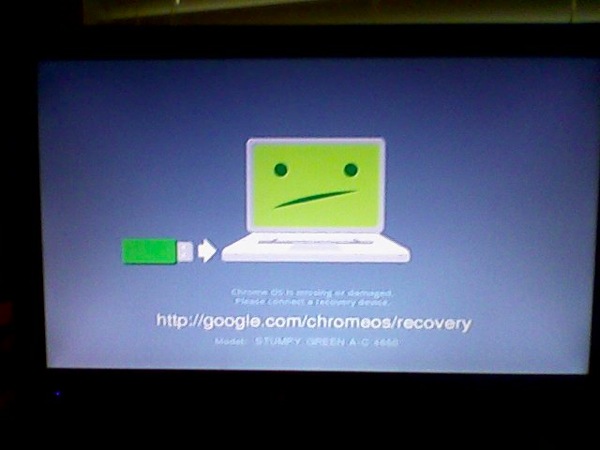
The first start of CHROMEBOX. Not very auspicious!
Leave a Comment » | Chromebook | Tagged: CHROMEBOOK | Permalink
Posted by reinkefj
Confirmed: Mountain Lion sends some 64-bit Macs gently into that good night
Rage if you want, but it appears the reason is related to graphics drivers.
by Chris Foresman – July 11 2012, 8:30am EDT
# – # – #
A very expensive love affair with the MacBookAir is over.
Apple has left me behind.
Time to cut my losses.
Apple is a dead end.
Planned obsolescence to the n-th degree.
Sorry, but APPLE has just gone on my NOTRECOMMENDED list.
Time to revisit UBUNTU.
# – # – # – # – #
Leave a Comment » | HARDWARE | Tagged: MACBOOKAIR, Mountain Lion | Permalink
Posted by reinkefj
Well, it is time to play they exit from the MCBA. Then, salvage what value I can from this trek down a technology mistake. A very expensive lesson.
So, what has to be done and what direction to take?
*Strategically, back to wintel, chrome tops, on to the cloud platform agnostic, or Linux?
* Strategically, what cloud services are impacted by platform, if any
* Strategically, where do the iPads fit in the technology plan
* Strategically, glad I didn’t lock into an iPhone. Do I need a “smartphone”. Don’t think so.
* Strategically, the mifis look smart now!
* Tactically, what about iCloud?
* Tactically, what about @me @mac
* inventory the apps on the MCBA
* what gets left on the island until the platform dies
* inventory the hardware that supports it
* what functions does it support and what’s the transition?
* What can be salvaged and sold off?
Argh, more work!
******
Leave a Comment » | MACBOOKAIR | Tagged: APPLE, MACBOOKAIR, obsolescence | Permalink
Posted by reinkefj
Home / Blogs / Cracking Open
Teardown shows Retina MacBook Pro is nearly impossible to upgrade, difficult to work on
By Bill Detwiler
July 5, 2012, 10:08 PM PDT
*** begin quote ***
Missing “Pro” features
And if all this wasn’t enough, Apple also dropped two features that set the MacBook Pro apart the thinner, but less “professional” MacBook Air–an Ethernet port and optical drive.
*** end quote ***
For awhile I was an Apple fan boy. For a very very short time before that I was a Wintel fan boy. Both times I’ve quickly soured over “offerings”.
For Wintel, it was bloatware, crapware, feature creep, automatic updates, DRM, activation. But what really put the ultimate knot in my shorts was win rot. That almost mandatory bare metal restore every six to nine months was unacceptable.
A brief love affair with Linux, it was just too hard to install. Too many distributions to choose from. And, they really wanted you to be a hardware geek. Personally, I’m astonished that large organizations with dedicated IT staffs haven’t jumped on this as opposed to Microsoft and it’s upgrade treadmill.
That all led me to Apple. I jumped in with Mac Book Air. And, for the most part it’s served me well. Except, like Wintel, it has Mac Rot. I’ve got several problems that the Geniuses haven’t solved and requires fairly frequent reboot. A bare metal install without a Lion distribution disk scares me silly.
I don’t like the whole app store concept.
Personal computing has morphed into being a pawn or cash cow for the big guys.
Maybe it’s time to revisit Linux.
But, I’m going to try a Chromebox first.
Maybe I’ll be a Google fan boy next. I doubt. I always seem to find the man behind the curtain.
# – # – # – # – #
Leave a Comment » | HARDWARE | Tagged: APPLE, Ethernet port, Missing “Pro” features, optical drive, Retina MacBook Pro | Permalink
Posted by reinkefj
and …
Perhaps, I haven’t explained myself well.
About the pogoplug and the disk drive.
You plug both into any power strip.
The disk drive plugs via usb into the pogoplug.
The pogoplug plugs via an RJ45 (local area network connection) (looks like a fat phone wire with bigger that a phone socket plugs on each end) into the ROUTER.
Note: it doesn’t plug into ANY computer.
(You can, but you don’t HAVE to. The value of this little 45$ linux box is that it is it’s own computer / appliance.)
Once you do that, I can give you a directory on the drive that you can:
(a) “mount” the drive on any computer on your home lan (wirelessly or wired) and use as you would the hard disk that’s internal to that computer. Including IPADs, ITOUCHs, IPHONES, and most smart phones.
(b) by correctly defining any path to the pogoplug via it’s web interface, it will give you a URL that you can “publish”, share, or use yourself.
So, for example, Luddite can upload his corny spam megabyte movie files to is and any one who has the link can look at it. ANd, would CLOG everyone’s mail systems with HUGE files.
So, for example, MIX2 can put the that big video on the “platform” and only allow certain people to see it. (Even if someone has the link, they can’t see it. I think it comes back “404 url not found” or something like that.)
SO, you can think of pogoplug as a “personal / group / public” cloud solution.
I’d like to deploy them at all my favorite people’s routers so that I can have off-site storage. (The power is use is about 8$ per year I’m told.)
I think it’s a neat device.
# – # – # – # – #
Leave a Comment » | HARDWARE | Tagged: personal cloud, POGOPLUG | Permalink
Posted by reinkefj
You are currently browsing the archives for the HARDWARE category.

 -
-
 -
-


 FJohn Reinke
Consultant at Technology Legacies LLC
Advisor, Computer Governance Committee at Manhattan College
Editor / Publisher at Jasper Jottings
Greater New York City Area
FJohn Reinke
Consultant at Technology Legacies LLC
Advisor, Computer Governance Committee at Manhattan College
Editor / Publisher at Jasper Jottings
Greater New York City Area


 JJ Positraction JJ Endnotes Downsize DC
Philosophy of Liberty

I have NOT received any gagged governmental information requests


You must be logged in to post a comment.