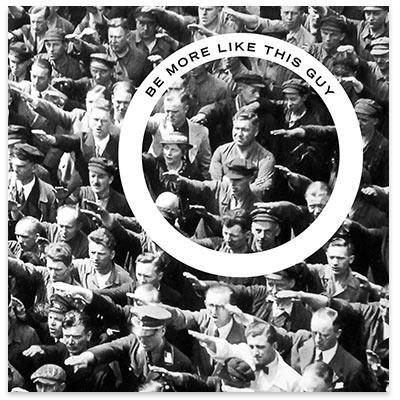
POLITICAL: South Burlington School District revolt

Monday, April 24, 2017

FROM WSJ

*** begin quote ***

A Mascot Mess 

When it comes to rebellious and cantankerous behavior, Vermonters go back a ways. They didn’t join the original 13 colonies in the Union until 1791, four years after the Constitution was signed. So in 1961, when education leaders in South Burlington decided that a newly built high school should be nicknamed the Rebels, nobody batted an eyelash. However, when the Board of School Directors decided the Rebels moniker had offensive connotations and needed to go, those Vermonters who didn’t agree reacted like, well, Vermonters. To protest the decision, opponents have twice helped vote down the nearly $50 million school district budget. The controversy heated up in 2015 when the Burlington Free Press newspaper dug up photos of cheerleaders and sports teams posing alongside Confederate flags. The school board has convened a new 40-member “South Burlington School District Mascot Selection Oversight Committee” to study the matter.

*** end quote ***

Hey, I don’t particularly care WHY they voted down the Gooferment Skrules budget. I think that’s it is ALWAYS GOOD when we starve the Gooferment Eddykation Complex.

# – # – # – # – # 


APPLICATION: “LOOK AT ME” I want it for calling the waiter / waitress

Sunday, April 23, 2017


# – # – # – # – # 

Never mind the “friends at concerts”; I want to signal the wait staff at the restaurants where they are supposedly “working”. 

Laugh!

# – # – # – # – # 

https://itunes.apple.com/us/app/look-at-me-with-color-beacon-strobe-light-in-rave-party/id966303117?mt=8

Look at me with Color beacon strobe light in rave party
By NIVIN REGI

Description

*********** FIND FRIENDS IN CROWD — THEATRE — CONCERTS **************

Ever wanted to find your friends are seated at a concert or in a movie theatre? Or wish your friend could meet up with your gang at crowded place ?

This app lets you helps you a lot !

You can pick the colour of the light u want, then send ur missing friend a message, saying ‘look for a blue blinking light on my iPhone’.

U then simply wave ur phone, the screen of which has been turned into a flashing coloured light, until u attract a friend’s attention.

Sounds utterly stupid but insanely useful right ? !!!

Come on give it a try. A must have app on ur iPhone. A situation may arise when you might suddenly feel the need to use it .

Uses:
• Finding friends in crowded concerts and music festivals. (Tried and tested)
• In a dark movie theater while watching Fast and Furious 7.
• Signalling my girlfriend to stop the car
• Getting a taxi

P.S: If you like the app, please give a positive review in the appstore. Good Ratings helps others to find the app.

P.P.S : Do buy the add free version in case you feel generous to tip me.

# – # – # – # – # 


APPLICATION: IOS app COLOR NAME

Saturday, April 22, 2017

I liked this app. And, my “older” friend’s wife LOVED it for the colorblind. I never thought of that 

# – # – # – # – # 

https://appadvice.com/apps-gone-free/2017-04-18

IDENTIFY COLORS WITH COLOR NAME

DESIGNERS, DECORATORS, AND ANYONE ELSE IN NEED OF IDENTIFYING SPECIFIC COLORS

Color Name is your color assistant. You can either take a new photo of an object from within the app or import your own. Then pinpoint the exact color you want identified by dragging your finger over the photo, and Color Name will provide you with the name and its RGB values in real time. Tap on the name of the color to get even more details including values for CMYK, HSB, and HEX. Color Name will also provide you with similar Pantone colors.

You have trouble with color. Color Name’s massive database even allows you to simply browse through various colors. You simply don’t have use for identifying color names.

https://itunes.apple.com/US/app/id904152346?mt=8

Color Name – identifier, picker and matcher tool
By Vlad Polyanskiy

Do you have difficulties with saying what color it is? Take a photo and touch the color you need on the photo, and we will show you its correct name.

# – # – # – # – #  


LINKEDIN: Changes to LinkedIn ToS due to MSFT?

Friday, April 21, 2017

Wonder what’s going to change?

# – # – # – # – # 

Hi FJohn,

On June 7, 2017, we are updating LinkedIn’s Terms of Service – our Privacy Policy and User Agreement. These updates to our terms will let us introduce new features, while continuing to give you control over how your information is used.

While I encourage you to read the full terms and my blog post about the changes, below is a quick glance at what’s new. Our goal is to increase the value you get out of LinkedIn, but you can also opt-out of these new features, if you’d like.

  • Increased visibility of your LinkedIn Profile – Service partners will show your profile to their users, similar to the way your profile shows up in search engines, so you can be more easily found for opportunities.

  • Easier to share your achievements with your network – We’ll suggest positive and public professional accomplishments, like new patents or publications, to add to your profile so others can see.

In addition, here’s two more new features you can choose to opt-in to:

  • Productivity bots to improve communication with your network – New automated systems will use information in your messages to suggest responses, meetings, ice breakers, or insights to help you have important conversations more easily.

  • Easily meet up with other members – You’ll have the ability to see members nearby who have also opted-in, so it’s easier to meet up when you’re at a conference or out for lunch.

If you’ve not already heard, we are now a part of Microsoft, but our services are still provided under a separate Terms of Service. We hope you find value in the updates we’ve made. If for any reason you don’t agree to the new terms and would rather close your account than opt out of specific new features, you can do so.

Thanks for being a member,

Sara Harrington,

Vice President of Legal at LinkedIn


# – # – # – # – # 


Hi FJohn,

On June 7, 2017, we are updating LinkedIn’s Terms of Service – our Privacy Policy and User Agreement. These updates to our terms will let us introduce new features, while continuing to give you control over how your information is used.

While I encourage you to read the full terms and my blog post about the changes, below is a quick glance at what’s new. Our goal is to increase the value you get out of LinkedIn, but you can also opt-out of these new features, if you’d like.

  • Increased visibility of your LinkedIn Profile – Service partners will show your profile to their users, similar to the way your profile shows up in search engines, so you can be more easily found for opportunities.

  • Easier to share your achievements with your network – We’ll suggest positive and public professional accomplishments, like new patents or publications, to add to your profile so others can see.

In addition, here’s two more new features you can choose to opt-in to:

  • Productivity bots to improve communication with your network – New automated systems will use information in your messages to suggest responses, meetings, ice breakers, or insights to help you have important conversations more easily.

  • Easily meet up with other members – You’ll have the ability to see members nearby who have also opted-in, so it’s easier to meet up when you’re at a conference or out for lunch.

If you’ve not already heard, we are now a part of Microsoft, but our services are still provided under a separate Terms of Service. We hope you find value in the updates we’ve made. If for any reason you don’t agree to the new terms and would rather close your account than opt out of specific new features, you can do so.

Thanks for being a member,

Sara Harrington,

Vice President of Legal at LinkedIn


GOVEROTRAGEOUS: Anyone visit the “new” Medicare site?

Thursday, April 20, 2017

https://www.mymedicare.gov/signout.aspx

They have updated their security requirements.

NewImage

Now are you telling me that you think that the “average” poor old senior citizen on a fixed income has to create a NEW unique password that’s hard to remember, not anything useful or memorable, and not one of the last nine?

Let me guess the most popular password set?

(password$1, password$2, password$3, password$4, password$5, password$6, password$7, password$8, password$9, password10)

Of course, that’s MUCH better than what LastPass would generate for me (i.e., triangumebabelinolowlysi, amplaintemproaramoniveri, tiongerystiorwarancemans, … … …). Well you get the idea!

NewImage

Look at those password requirements.

A 16 character limit? I always use LastPass’ 24 option.

Add a number and one of a few special characters? In technical terms, it increase the entropy from (26**16) to (44**16) where as my LastPass choice would be (26**24). Who’s password is better?

Argh!

# – # – # – # – # 


SOFTWARE: Microsoft Word — wonder how I can do … …

Wednesday, April 19, 2017

Microsoft Word — wonder how I can do … …

… …

… … I want a block of text in two places in a document and “live”.

Meaning if I update either, then the change is reflected in both places.

Any one have an idea how to do it?

# – # – # – # – # 


APPLICATION: SNAPCHAT on iPhone7+

Tuesday, April 18, 2017

IMG 0981 copy

Interesting.

A younster was surprised that a fat old white guy retired injineer, who’s just a poor old senior citizen on a fixed income, would have SNAPCHAT on his phone.

I told her: “I don’t like it. I don’t use it that much. I don’t understand the UI.” 

Or something like that, because of course, the messages disappear. Argh!

I like to see what I said. And mull it over. See what the other person is responding to.

Also, it doesn’t save pictures. Even on my local “cameral roll”. YELP does that for me. 

AND, it doesn’t allow you to use an existing bitmoji easily. But it can be done if you understand that “create” doesn’t mean what I thought it did— from scratch.

NewImage

P.S. Feel free to give me your insight.

# – # – # – # – # 


RECOMMENDED: Google’s PhotoScan app

Monday, April 17, 2017

https://www.google.com/photos/scan/

7. Search Scanned Photos

Google recently released a new free app called PhotoScan with the aim of letting you digitize all your old photos. If you’ve installed the app, you can access it by clicking the three lines at the top left of Google Photos, then clicking “Scan photos”. Going forward, simply search for scans whenever you want to see all the photos you digitized.

# – # – # – # – # 


POLITICAL: “Voter Fraud” is a fact of political life

Sunday, April 16, 2017

http://granitegrok.com/blog/2017/03/lets-get-real-new-hampshire-voter-fraud

BILL GARDNER NEW HAMPSHIRE VOTE FRAUD
Let’s Get Real About New Hampshire Voter Fraud
by ED NAILE

*** begin quote ***

NH1 News seems to be the only statewide media, other than bloggers, interested in the possible loss of a US Senate seat to voter fraud.

Finally, Secretary of State William Gardner is beginning to open the door to the possibility of voter fraud affecting statewide elections in NH. It is a breakthrough even though the numbers he uses are not what they seem.

*** and ***

Is anyone investigating the people who showed up to vote same-day with zero identification? That would be the ones who we take a picture and affidavit from? That wasn’t clear from Gardner’s interview.

I think if we used real numbers, instead of conveniently dodging the total amount of out-of-state voters, the number of people we need to investigate might be a bit higher than 458.

When this investigation is over it would be nice to see the names of the 480 ghost voters who might have swayed a US Senate race in NH.

Oh, but that public information is not public, nor is our taxpayer-payed-for statewide voter database, as they are in many other states – so how would anyone find out?

*** end quote ***

Argh!

When I think of “voter fraud”, I think of Chicago, Philly, NYC, or LA. Not NH.

Maybe that’s a global issue.

What’s wrong with requiring voter registration in advance and a photo id requirement?

You can’t get on a plane nowadays without it.

Argh!

# – # – # – # – # 


VOCABULARY: Is calendarize a word?

Saturday, April 15, 2017

Is calendarize a word?

I accidentally used it in a text message. And it wasn’t flagged?

So I googled it and it had it. 

Thought that was odd; like me. So I went to my bookmarked dictionary site.

https://www.merriam-webster.com/

https://www.merriam-webster.com/dictionary/calendarize

NG

So then I tried another site. 

http://www.dictionary.com/browse/calendarize

calendarize


[kaluh n-duh-rahyz] 
Spell Syllables
verb (used with object)calendarized, calendarizing.

1.

to calendar; add (an appointment, event, deadline, etc.) to acalendar, schedule, or timetable.
Origin of calendarizeExpand
Dictionary.com Unabridged
Based on the Random House Dictionary, © Random House, Inc. 2017.

calendarize. Dictionary.com. Dictionary.com Unabridged. Random House, Inc. http://www.dictionary.com/browse/calendarize (accessed: April 8, 2017).

# – # – #

So now I have TWO dictionaries bookmarked and I didn’t invent anything.

Sigh! So sad.


# – # – # – # – #