CLOUD: I fail the cloudflare robot test

Wednesday, February 19, 2025

Here’s an odd bug that no one seems interested in: 

Using opera air when I go to signon I fail the cloudflare robot test. Argh! I’m not a robot. When I click on the cloudflare link it knows I’m not a robot. Suggestions?

*** begin quote ***

Sorry to hear you are having troubles! Unfortunately, we have no control over what Cloudflare returns in these challenges. If you have any add ons or extensions enabled, you could try disabling these in case they are interfering with the validation.

Another option would be to use the login link option from the login page. This will email you a link that will log you in to your account automatically.

Cheers,
The Penzu Support Team

*** end quote ***

Of course, CLOUDFLARE has no end User support.  Interesting that I’ve never seen that happen before.

YMMV.

—30—


CLOUD: Yet another “web service” gets dropped for whatever reason

Tuesday, April 9, 2019

2019-Apr-09

IMPORTANT NOTICE ABOUT YOUR MICROSOFT HEALTHVAULT SERVICE
Microsoft HealthVault service to end November 20, 2019
This notice contains important information from the HealthVault team at Microsoft. Please read this notice immediately; it contains time-sensitive information that may require you to take action.

We are reaching out to you because you are a registered user of the HealthVault service. We are providing you this notice to ensure you are aware of an important development:

The Microsoft HealthVault service will be shut down as of November 20, 2019.
Data you have in your HealthVault account will be deleted effective November 20, 2019. If you wish to keep the data in your account, you need to take action now to transfer that data from your HealthVault account.
Please take appropriate action to move your data or information you may have stored in your HealthVault account. To help customers that wish to transfer their data out of HealthVault, several options are available and described below.

If you are using an Application (mobile, web, etc.) that is dependent on the HealthVault service, such applications may also stop working once the HealthVault service is shut down. Please reach out to the Application provider for information on their plans.

We appreciate your use of the HealthVault Service. If you have questions regarding this communication please do not hesitate to reach out to HealthVault Customer Support.

The HealthVault Team
Microsoft Corporation

Questions:

What date will the HealthVault service become unavailable?
The HealthVault service will become unavailable on November 20, 2019.
Will I be able to access or add new data to my HealthVault account after November 20, 2019? 
No, when the HealthVault service is shut down on November 20, 2019 your account will be closed. You will no longer be able to access the account or any data in it. If you want to keep the data that you currently have in your HealthVault account, please take action now to either download your data or transfer that data to another record keeping service, or your data will be deleted on November 20, 2019.
Can I delete my account and/or the data in it before November 20, 2019? 
Yes, you may proactively delete your account before November 20, 2019 if you choose to do so. For help, view the HealthVault Help section, Your HealthVault Account – “How do I close my HealthVault Account?”
Can I obtain a copy of or download my data before November 20, 2019? 
Yes. You can download your data by logging into your account and choosing to export your data. Details on how to export data can be found under the HealthVault Help section, Health Information – “How do I export and save health information from HealthVault?”. Once you have exported your data you have the option to take it to another record keeping service of your choice (for example, a Personal Health Record (PHR) service).
Is there an option for me to transfer or export my data to another Personal Health Record (PHR) provider?
The following companies should be able to provide you with a streamlined option to export your data to one of their PHR services. If you would like to use one of these services, you will need to authorize the HealthVault application to export your data to that service. You can find more information for these options here:How do I export my data to Get Real Health’s Lydia? (US and International Customers)
How do I export my data to FollowMyHealth®? (US Customers Only)

Please be aware that these companies are not affiliated with Microsoft, so if you export your data to them Microsoft will no longer be responsible for that data or its safekeeping. Because your data instead will be governed by the terms of service and privacy and security policies and practices of these companies, you should familiarise yourself with those terms, policies and practices before exporting your data to these companies.
What happens to my data if I do not wish to download or transfer it or if I don’t take any action before November 20, 2019? 
If you do not wish to download or transfer your data, you may proactively delete your account and the data contained within before November 20, 2019. If you do not take any action then your data will be automatically deleted when the HealthVault service is shut down on November 20, 2019.
Will I or my provider be able to access my HealthVault emergency profile after November 20, 2019? 
No, your HealthVault emergency profile will not be accessible by you or others after November 20, 2019.
I have set up devices like a blood pressure cuff to send data to my HealthVault account. What happens to these connections? 
On November 20, 2019 HealthVault will stop accepting any new data from all devices. Until then, you may continue to send data to your HealthVault account using your devices (unless you have closed your account).
I currently use HealthVault Connection Center to connect my device with my HealthVault account. Will HealthVault Connection Center continue to work past November 20, 2019? 
HealthVault Connection Center is also being decommissioned and will no longer be able to send data to your HealthVault account once the HealthVault service is stopped on November 20, 2019.
How do I stop getting notifications about the deprecation of HealthVault? 
You may delete your HealthVault account now to stop receiving these notices. 
For more information on how to delete your account, see the HealthVault Help section, Your HealthVault Account – “How do I close my HealthVault Account?”.
I use an Application on my phone that sends my data to HealthVault. Will this Application still work after HealthVault is gone? 
That will depend on what the Application does. There may be some limited functionality that the Application can still perform, or it may stop working completely as it will no longer be able to access the HealthVault services. For technical problems with a specific Application you should contact the Application provider.

Privacy Statement

Microsoft Corporation 
One Microsoft Way 
Redmond, WA. USA 98052

# – # – # – # – #

[JR: Argh! The big companies suck and will throw you over the side as soon as they can’t make a buck?]

— 30 —


CLOUD: Revolar goes toes up

Thursday, October 26, 2017
 
 
To Whom It May Concern: 
 
We are contacting you to notify you that Revolar, Inc (“Revolar”), has made an assignment for the benefit of creditors (“Assignment”) as of September 25, 2017 (“Assignment Date”) and appointed an Assignee.
 
“Proof of Claim” notices are a required formality of the assignment process
 
Under Delaware law, the Assignee is required to send a notice regarding the assignment. This notice must be distributed within a timely manner of the start of the assignment and is intended to determine monies owed by Revolar. The Assignee is also required to provide a mechanism through which any party who may potentially have a claim against Revolar can file a claim. That mechanism is known as a “Proof of Claim” process, and Revolar claims can be filed on the website provided below.
 
Why you were sent a Proof of Claim
 
A Proof of Claim is available to all parties who have interacted with Revolar during the last couple of years to ensure that if they believe they have a claim, it is accounted for. It is not confirmation that you necessarily have a claim.
 
Proof of Claims are exactly what they sound like. If you believe Revolar owed you money prior to the Assignment Date and has not paid you, you’ll need to fill out the Proof of Claim form and return it according to the instructions found on the form, before March 24, 2018. The language on the claim form is formal and legalistic, but it is a necessary part of the process as we work to resolve the situation and outstanding debts.


Should you have any questions about the Proof of Claim form, you may contact the Assignee at:
 
Revolar (assignment for the benefit of creditors), LLC
P.O. Box 391600
Mountain View, California 91600-1600
United States
+1 650 412-2521 Facsimile
 

CLOUD: PLAXO bites the dust

Sunday, October 1, 2017

Dear Plaxo User,

After 15 years of helping customers enrich their address books, we regret to announce that we will be shutting down the Plaxo service at the end of the day on December 31, 2017.

We will begin purging user data on January 1, 2018. If you would like to export your address book data, please do so before that date. Instructions for how to export your data are available here.

Thank you for subscribing to Plaxo. We appreciate the support you have given us over the years and we wish you all the best.

– The Plaxo Team

# – # – # – # – # 


CLOUD: AMAZON pulls the rug out

Friday, June 23, 2017

Dear ferdinand j. reinke, 

Amazon is no longer offering an unlimited storage plan. As a current unlimited storage plan customer, you can choose to keep your existing unlimited plan through the end of your current subscription. Your Prime Photos benefit of free unlimited photo storage is not changing, so you can continue to store all your photos, plus 5 GB of additional content, for free. 

At any time, you can cancel your subscription or switch to a new annual storage plan of 100 GB for $11.99 per year, or $59.99 per 1 TB per year, up to 30 TB, by visiting your Manage Storage page

If you have auto-renew turned on and less than 1 TB of non-photo data, you will be automatically renewed into a new 1 TB plan for your existing rate of $59.99/year at your renewal date. If you have auto-renew turned off or have over 1 TB of non-photo data, we will notify you by email before your subscription end date to remind you that you will need to choose a new storage plan. If you choose not to renew your subscription, digital files that exceed your allotted free storage will be deleted after a grace period of 180 days in accordance with our Data Retention Policy

For more information about our storage plan changes, please visit our FAQ page

Thank you, 

Amazon

# – # – # – # – # 


CLOUD: Another free sharing site bites the dust

Wednesday, June 21, 2017

http://www.zdnet.com/article/microsoft-to-shut-down-its-docs-com-file-sharing-site-december-15/

Microsoft to shut down its Docs.com file-sharing site December 15
Microsoft is shutting down its Docs.com site in December and advising affected users to go with LinkedIn’s SlideShare and/or OneDrive for their file storage needs instead.
By Mary Jo Foley for All About Microsoft | June 9, 2017 — 11:40 GMT (04:40 PDT) | Topic: Cloud

 *** begin quote ***

Officials posted a notice of the planned end of service on June 9 on its Docs.com site. In that note, Microsoft attributed overlap between SlideShare, which is part of LinkedIn, and OneDrive with Docs.com as the reasons for the December 2017 closing. Microsoft bought LinkedIn last year.

Microsoft is advising users to migrate and/or delete content they shared on Docs.com as soon as possible.

*** end quote ***

Clearly, you can NOT depend on anything that is free.

It either goes PAY or goes away.

That, imho, reenforces Google Drive, Dropbox, and iCloud as reliable services.

# – # – # – # – # 


CLOUD: AT&T Locker shutdown; no reduction in price

Friday, May 26, 2017

AT&T Free Msg: AT&T Locker, a cloud storage service you or someone on your account set up, is permanently closing on 8/3/17. Photos, videos, contacts, music, and docs in your Locker will be deleted after that date. Download your content using a computer at locker.att.net. You won’t be able to upload anything after 6/4/17. More at att.com/lockerhelp

# – # – # – # – # 

Can’t depend upon anything staying around. 

# – # – # – # – # 


CLOUD: Google is “blind” to what3words addressing

Monday, April 3, 2017

https://what3words.com/ 

When I search for “where is what3words shed.varieties.menu”, I get send to the what3words website.

Doesn’t Google understand that shed.varieties.menu is a location using this universal addressing scheme.

# – # – # – # – # 

I guess not!

So much for google being the all-seeing all-knowing tool.

Argh!

# – # – # – # – # 


CLOUD: Amazon Prime Videos broken?

Saturday, February 11, 2017

2017-Feb-11 1221 


Amazon
Your Account Amazon.com
Message From Customer Service
Hello Ferdinand,

I’m sorry to hear that you’re receiving geographical restrictions errors while trying to watch Amazon Videos.

Upon checking our resources, I found that there’s an ongoing issue with this error. Our technical team is working on this issue to fix this at the earliest.

A little patience is all we require from your side while we work on this issue.

We look forward to seeing you soon.

Best regards,
Keerthi U
Thank you.
Amazon.com


# – # – # – # – #  2017-Feb-11 @ 12:21  


CLOUD: Google’s New Trusted Contacts Shares Your Location with Loved Ones In Real Time

Sunday, December 11, 2016

Google’s New Trusted Contacts Shares Your Location with Loved Ones In Real Time
http://lifehacker.com/googles-new-trusted-contacts-shares-your-location-with-1789666993

# – # – #

Ever since “a certain young lady” has me watching the crime shows (i.e., L&O of all genres and Investigation Discovery), I’ve realized how important it is for me to have “trusted contacts” in case she “sacks” me. (Never knew how many women killers there were IRL!)

Laugh!

You might want to avail yourself of it. 

Android only! (Boo, on Google!)

# – # – # – # – # 


CLOUD: Another “cloud” is proved unreliable

Tuesday, September 6, 2016

2016-Sep-06

MAILCHIMP is unresponsive.

*** begin quote ***

You submitted your compliance questionnaire on Aug 14, 2016 8:08 pm, and our team is reviewing your responses. While your account is under review, you’ll be unable to send live or test campaigns, but Campaign Builder, signup forms and reports still work.

We respond to users in the order their information is received, so someone will be in touch with you soon. Our office hours are Monday-Friday, 9am-5pm EST.

*** end quote ***

Beware!

# – # – # – # – # 


CLOUD: Backup your work ALWAYS

Friday, July 22, 2016

http://www.foxnews.com/tech/2016/07/19/google-takes-down-mans-blog-erasing-14-years-work.html

GOOGLE
Google takes down man’s blog, erasing 14 years of work
By Michael Harthorne  Published July 19, 2016  Newser

*** begin quote ***

An acclaimed artist says he lost 14 years of work when Google took down his blog last month.

Artist Dennis Cooper made a horrifying discovery June 27: His 14-year-old blog—the sole home of his experimental writing, research, photographs, and more—was gone, Art Forum reports.

*** end quote ***

Backup, backup, backup.

“Two is one; one is none.” (Old military preparedness adage.)

There really is no excuse for getting caught short like this.

Take this as your OFFICIAL warning.

(Despite the illusion, only BAD stuff stays on the inet forever!)

# – # – # – # – # 

Was it done to stick one in the eye of the ordinary viewer who looks at the hijab as a sign of the slavery of Muslim women by a male- dominated and clearly violent religion?


CLOUD: FACEBOOK has new “forgot password” hurdle

Saturday, May 28, 2016

2016-May-28 1020

Last night I was playing “tech support” and helping a noob get setup on my “loaner chromebook” while his win doze machine was at the Geek Squad for some kind of service. (Sounds like a motherboard failure.)

Of course, like most people — even those who should know better — he doesn’t remember his passwords.

(Of course, he doesn’t use LASTPASS, KEYPASS, or any other the other countless utilities. Argh!)

So we walked him through “forgot my password” on GMAIL, FACEBOOK, etc. etc.

All was going well, until FACEBOOK allowed him to reset his password, but then locked him out for 24 hours. 

(I could not get a screen shot of it. Others were at the controls “to learn” cause I go to fast. Argh!)

So be advise, FACEBOOK has put another wrinkle in your way.

https://lastpass.com/getlastpass1.php

Argh!

#FACEBOOK

# – # – # – # – #  2016-May-28 @ 10:27  


CLOUD: Let’s explain why our service won’t do something so obvious?

Monday, May 2, 2016

Dear Valued Client,


We are unable to resolve this via an e-mail request. Please allow us to explain to you the situation. Please call Paytrust Customer Service at 1-800-729-8787 and a member of our support staff will assist you with your concern properly. I apologize for any inconvenience.


Regards,


Lebanon M.
April 30, 2016

Bill Payment Services Provided by Metavante Payment Services, LLC
 
# – # – # – # – # 
 
Argh! (Nice font though.)
 
# – # – # – # – # 

CLOUD: OneDrive reduces your space

Wednesday, April 13, 2016

*** begin quote ***

Changes to OneDrive
We want to let you know about some upcoming changes to OneDrive. On July 13, 2016, the amount of storage that comes with OneDrive will change from 15 GB to 5 GB. We are also discontinuing the 15 GB camera roll bonus. You can learn more at our FAQ.
There is no action you need to take, because your OneDrive account is currently below the new storage limits. Even though you aren’t currently affected, we want to keep you updated on all important changes to OneDrive. If you’d like to check your account, you can visit the Storage page.
We realize these are big changes to a service you rely on. We want to apologize for any inconvenience they may cause you. We made a difficult decision, but it’s one that will let us sustainably operate OneDrive into the future.
Thank you for using OneDrive.

– The OneDrive Team


*** end quote ***

Argh!

# – # – # – # – # 


CLOUD: Google Wallet bites the dust

Thursday, April 7, 2016
Your Wallet Card will stop working on June 30
Hello Ferdinand,
We want to thank you for using the Wallet Card and for any feedback you’ve shared.
After careful consideration, we’ve decided that we’ll no longer support the Wallet Card as of June 30. Moving forward, we want to focus on making it easier than ever to send and receive money with the Google Wallet app.
Here’s what this means for you:
  • You can only make purchases with your Wallet Card until June 30.
  • You won’t be able to add money to your Wallet Balance from a debit card or bank account after May 1, but money you receive from others will still be added to your balance.
  • If you have money in your Wallet Balance after May 1, you can keep it there, send it to others, or cash out anytime for free.
If you’re interested in finding a replacement for your Wallet Card, both American Express and Simple offer debit accounts with similar features, including a card. Plus, we’ve teamed up with them so that Wallet Card users will get an added bonus after signing up.
As we wind down support for the Wallet Card, we’re excited to continue enhancing Google Wallet to give you the best possible experience when paying friends and family. We’re hard at work on new features, so keep an eye out for those in the coming months.
If you have any questions, visit our FAQ.
The Google Wallet Team


# – # – # – # – # 


CLOUD: LinkedIn change?

Saturday, February 20, 2016
Hi FJohn,
 
 
At LinkedIn, we’re always looking for ways to make your professional life better. This sometimes means shutting down certain features that aren’t heavily used to invest in others that offer value for our members. 

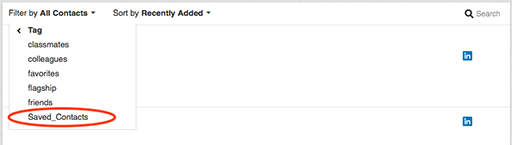
On February 25th we’ll be removing the ability to save new contacts and sort your contact list by saved contacts. We’ve migrated the contacts you’ve already saved to a tag called “Saved_ Contacts” so you won’t lose anything you’ve already stored. To access your saved contacts from the LinkedIn desktop site: 

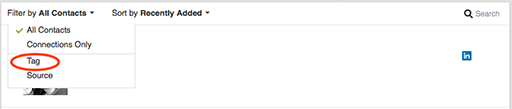
1. Go to “My Network” on the top navigation bar and select “Connections.” Scroll down to your Contacts list and click on the “Filter by” dropdown on the left. 

2. Select “Tag.” 

Calendar

3. In addition to a list of tags you may have created you’ll find a newly added tag called “Saved_Contacts.” Click on this tag to display your previously saved contacts. 

Calendar

We apologize for any disruption or inconvenience this may cause. If you have any questions, please contact our Help Center

Thanks for being a member,
The LinkedIn Team 


# – # – # – # – # 

OK, I pay 500$/year and the change may negate what I use it for. Argh!

# – # – # – # – # 


Hi FJohn,
 
 
At LinkedIn, we’re always looking for ways to make your professional life better. This sometimes means shutting down certain features that aren’t heavily used to invest in others that offer value for our members. 

On February 25th we’ll be removing the ability to save new contacts and sort your contact list by saved contacts. We’ve migrated the contacts you’ve already saved to a tag called “Saved_ Contacts” so you won’t lose anything you’ve already stored. To access your saved contacts from the LinkedIn desktop site: 

1. Go to “My Network” on the top navigation bar and select “Connections.” Scroll down to your Contacts list and click on the “Filter by” dropdown on the left. 

2. Select “Tag.” 

Calendar

3. In addition to a list of tags you may have created you’ll find a newly added tag called “Saved_Contacts.” Click on this tag to display your previously saved contacts. 

Calendar

We apologize for any disruption or inconvenience this may cause. If you have any questions, please contact our Help Center

Thanks for being a member,
The LinkedIn Team 


CLOUD: My desire to leave the Apple / Microsoft “jail” is hindered by these functions or programs

Saturday, May 2, 2015

TO produce my Jasper Jottings:

  • BlueGriffon — to compose HTML
  • MARSEDIT — to capture my daily Jasper Jottings blog
  • FileZilla — to post it
  • Mail chimp — web-based service
  • Yahoo Group — web-based service 

TO produce my blog:

  • MARSEDIT —blog posts
  • TEXEXPANDER — for quotes and shorthand

Other functions

  • iMessage — for texting
  • Opera Mail — for yet another Mail program and rss feeds
  • PROXPN — for privacy on public wifi
  • LIBRE OFFICE — microsoft compatibility
  • CLIP MENU — for cut and paste memory 
  • DOXIE — for scanning
  • FACETIME — for video calls
  • FITBIT CONNECT — for tracking
  • FORMAT MATCH — cut and paste format free text
  • LASTPASS — password generation
  • SCRIVENER — for writing; constrained by disk space
  • PHOTO — space constrained

Any suggestions?

# – # – # – # – # 


CLOUD: Have to find a cloud based text expansion utility

Friday, March 20, 2015

Does such a thing exist?

–30–


CLOUD: Move to the cloud

Thursday, March 19, 2015

Finally, I’ve going to move off the Apple and Microsoft infrastructure and on to the “cloud”.

Will be looking for alternatives to take the things I do to the cloud.

“Blundering along”

Laff.

The Chromebook and chromebox have imho won the cheap thin client hardware battle.

Have to see if there are any problems?

–30–


CLOUD: GOOGLE DOC Sharing is unavailable?

Thursday, January 22, 2015

2015-Jan-22 1155 

GOOGLE DOC Sharing is unavailable?

Try later?

Argh!

# – # – # – # – # 


CLOUD: Foursquare morphs

Thursday, July 24, 2014

Foursquare logo

Hi ferdinand,

About five years ago, we launched a little app called Foursquare. As one of the first million people to sign up for Foursquare, you’ve been with us pretty much since the beginning. You’ve seen us grow from a tiny project to a 50,000,000-strong community. And, we’re about to embark on our biggest change yet. We are rolling out two apps – Swarm and Foursquare – one focused on keeping up and meeting up with your friends, the other focused on finding great places. As one of the first to try Foursquare, we wanted you to also be one of the first to see everything that we’ve been hard at work on over the past few months.

Everyone explores the world differently – guided by their own unique tastes, their friends, and the people they trust. Local search has never been good at this. It doesn’t get you, and, as a result, everyone gets the same one-size-fits-all results. Why should two very different people get the same recommendations when they visit Paris? Or the same list of places when they’re looking for a bar? We’re about to change that. In a couple weeks, we’re rolling out a brand new version of Foursquare that’s all about you. Tell us what you like, and we’ll be on the lookout for great places that match your tastes, wherever you are.

This means a few changes.

– First, starting tomorrow, we’re moving all check-ins to our new app, Swarm. Don’t worry; all your past check-ins, all your friends, all your photos, they’re all automatically in Swarm.
Over three quarters of you are already on the new app. (Thank you! And keep sending us feedback; we’re hustling on making improvements every day – get a preview of what’s next here) For everyone still using Foursquare to check in, you’ll need to download Swarm to keep checking in.

– Second, if you build a totally new app, you need a totally new logo. Our logo is changing from the check-in checkmark to something representing the new Foursquare. We designed it to be a mix of map pin and superhero emblem. We’ve always thought of Foursquare as giving you superpowers to explore your city, and our new logo reflects that vision. It’s coming soon to a homescreen near you.

Foursquare Logo

– Finally, we wanted to give everyone a peek at what’s coming. Here’s what you see when you open the new Foursquare. No two people view the world exactly the same, so no two people will have the same experience with the app. Once you teach Foursquare a couple things about you – add tastes, follow experts, or even just walk around for a few days – the app will be 100% yours.

Foursquare Home Screen

This is the beginning of the ‘personalized local search’ future we’ve been talking about since we started Foursquare. It’s been built with the help of our amazing 50,000,000-strong community, with all your tips, check-ins, photos, and the smarts we layered on top of that. You’ve been with us for a while, and all of your check-ins and history will continue to help shape your recommendations.

We can’t wait to get the new Foursquare, and new versions of Swarm, in your hands. If you use Foursquare to check in, download Swarm today. And, if you’ve been waiting for real local search, not just the yellow pages on your phone, stay tuned. The all new Foursquare will be here really soon.

– Team Foursquare

# – # – # – # – #   

Not so sure I want to play along.

# – # – # – # – #   


CLOUD: LASTPASS earns confidence

Saturday, July 19, 2014

A Note from LastPass
41 LastPass : The last password you’ll have to remember by Amber Gott / 1d // keep unread // hide
FacebookShare on Google PlusTwitterHootsuiteLinkedInHootsuiteBufferCustom Sharing Tool
save for laterEvernoteSend to readabilityOneNoteAdd to InstapaperPocket +TAG
LastPass is in part able to achieve the highest level of security for our users by looking to our community to challenge our technology.

In August 2013, a security researcher at UC Berkeley, Zhiwei Li, contacted us to responsibly disclose novel vulnerabilities with the LastPass bookmarklets (actively used by less than 1% of the user base) and One Time Passwords (OTPs). Zhiwei discovered one issue that could be exploited if a LastPass user utilized the bookmarklet on an attacking site, and another issue if the LastPass user went to an attacking site while logged into LastPass, and used their username to potentially create a bogus OTP.

Zhiwei only tested these exploits on dummy accounts at LastPass and we don’t have any evidence they were exploited by anyone beyond himself and his research team. The reported issues were addressed immediately, as confirmed by their team, and we let them publish their research before discussing it.

If you are concerned that you’ve used bookmarklets before September 2013 on non-trustworthy sites, you may consider changing your master password and generating new passwords, though we don’t think it is necessary.

Regarding the OTP attack, it is a “targeted attack”, requiring an attacker to know the user’s username to potentially exploit it, and serve that custom attack per user, activity which we have not seen. Even if this was exploited, the attacker would still not have the key to decrypt user data. If you’d like to check your current OTPs you can do so here: https://lastpass.com/otp.php

We appreciate that, as the most popular password manager in the world, we have an active, dedicated community that challenges us to be better and is committed to helping us improve the security of our service. Again, we thank Zhiwei and his team for their important research.

Regards,
Joe & The LastPass Team

# – # – # – # – #   

I trust them.

BUT, (and there is always a BIG butt), …

… no one has my bank password.

# – # – # – # – #   


CLOUD: Google is changing “stuff”

Sunday, July 6, 2014

Today, GOOGLE automagically merged three of my email accounts. Confused me to no end. Automatically when I was composing a message, it switched me to my PREP account when I was writing for my JASPER account. 

Argh!

I foresee bad times ahead. Have to prepare to abandon Google?

# – # – # – # – #   


CLOUD: Office 365 and an outage

Friday, June 27, 2014

Sonja Thompson
Editor of this Newsletter
Sonja Thompson | Senior Editor | @sonjathompson
Sonja Thompson is a Senior Editor of TechRepublic.com.
New Office 365 OneDrive storage is essentially “unlimited”

Microsoft bumped the OneDrive cloud storage for all Office 365 accounts to a whopping 1 TB.

# – # – # – # – #   

And it was down for a day in America.

# – # – # – # – #   


CLOUD: Microsoft updating terms of use and privacy statement

Thursday, June 19, 2014

We’re updating our terms of use and privacy statement.


Our users’ needs are at the center of everything we do. That’s why we are updating the Microsoft Services Agreement and providing a Privacy Statement for Windows Services. We want to take this opportunity to highlight some of the key changes and what they mean for you.


Privacy
As part of our ongoing commitment to respecting your privacy, we won’t use your documents, photos or other personal files or what you say in email, chat, video calls or voice mail to target advertising to you.


Transparency
We updated our Code of Conduct so you can better understand the types of behaviors that could affect your account, and added language that parents are responsible for minor children’s use of Microsoft account and services, including purchases.

Simplicity
We tailor our privacy statements for each of our products to help make it easier for you to find the information that is important to you.


The Microsoft Services Agreement applies to your Microsoft account and includes many of our customer services such as Outlook.com, OneDrive, and Bing, while the privacy statement explains how your personal information is collected, used and protected across your Microsoft account, Outlook.com and OneDrive.


The new updates to these will take effect on July 31, 2014. If you continue to use our services after July 31, 2014, you agree to the updated terms or, if you don’t agree, you can cancel your service at any time.


We encourage you to use the links below for further details and to view the full agreements online.


Thank you for using Microsoft products and services.


Privacy Policy

Microsoft

Microsoft respects your privacy. Review our online Privacy Statement.

Microsoft Corporation, One Microsoft Way, Redmond, WA 98052

# – # – # – # – #   

Sigh!

# – # – # – # – #