We continually strive to improve your FiOS® TV service and are making enhancements to create an even simpler and better experience for you. These changes will occur on Tuesday, January 21, 2014,and will cause your Set Top Box to automatically reboot, which means turning off and on. If you experience any issues with your Set Top Box as a result of this automatic reboot, please unplug your Set Top Box and plug it back in. This should resolve most issues.
Some of these enhancements include:
Adding more Closed Captioning capabilities
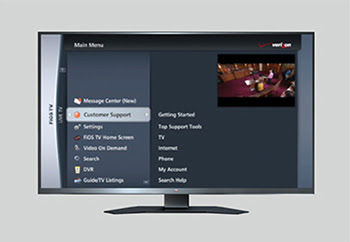
Simplifing your FiOS TV menu by:
Consolidating our Customer Support section, making it easier for you to use
Renaming your DVR Settings to Configure & Upgrade
Allowing you to access all of your TV listings using the Guide View header in Guide/TV Listings
Your Parental Controls will also be enhanced to enable you to temporarily turn them off for a period of 4 hours. This new capability will allow you to turn your Parental Controls off to enjoy an evening of TV watching without having to remember to turn them back on later. They will automatically resume after the 4 hour period. To use this functionality, press the Options button on your FiOS® TV Remote Control while watching live TV and select Parental Controls.
Thank you for choosing Verizon. We hope these new enhancements help you enjoy your FiOS TV service for many years to come.
Sincerely,
Your Verizon Team
# – # – #
I don’t see anything that I need. So why do I have to upgrade? Time to rethink the paradigms and memes involved.
This entry was posted on Sunday, January 19th, 2014 at 18:51 and is filed under HARDWARE. You can follow any responses to this entry through the RSS 2.0 feed.
You can skip to the end and leave a response. Pinging is currently not allowed.
FJohn Reinke
Consultant at Technology Legacies LLC
Advisor, Computer Governance Committee at Manhattan College
Editor / Publisher at Jasper Jottings
Greater New York City Area

 -
-
 -
-


 FJohn Reinke
Consultant at Technology Legacies LLC
Advisor, Computer Governance Committee at Manhattan College
Editor / Publisher at Jasper Jottings
Greater New York City Area
FJohn Reinke
Consultant at Technology Legacies LLC
Advisor, Computer Governance Committee at Manhattan College
Editor / Publisher at Jasper Jottings
Greater New York City Area


 JJ Positraction



 Reinke Faces Life