MACBOOKAIR: Could Apple have a wifi software problem?

Friday, March 4, 2011

I don’t know. I don’t have the hardware, software, or expertise to debug the situation. But, when my MIFI and my WIFI, both have sucky performance. And, programs, that access the network, seem slow. And, I ‘always’ see “searching for networks”. Could it be that they have a significant problem with wifi at the operating system level?

Sigh!

How to figure that our?

# # # # # posted 2011-03-04 11:58


SOFTWARE: CARBONITE is NOTRECOMMENDED

Friday, March 4, 2011

I did the fix and the problem still exists.

Their response is to “call” us. Argh!

This is supposed to be “production quality” software on a bullet-proof OS.

It’s an illusion.

I’ve moved CARBONITE to my list — NOTRECOMMENDED!

# # # # # posted 2011-03-04 05:54


SOFTWARE: CARBONITE has a complicated fix?

Thursday, March 3, 2011

To whom it may concern:

This is a stunning set of instructions. And, you expect non-techies to perform these steps. I’d say you have a design problem to have to do this.

Fjohn

# # # # #

Carbonite Mac Support wrote:

Response (Ricky C.) 03/02/2011 02:26 PM

Hello Ferdinand and thank you for contacting Carbonite Customer Support.

We reviewed our records under your email address ‘XXXXXX’ and it indicates that you have backed up 33GB of data approximately on Carbonite server from your Mac named ‘ferdinand-reinkes-macbook-air’ and 5 files are left pending for backup.

We request you to uninstall Carbonite from your Mac manually and then reinstall it in order to fix the issue of high CPU usage of your Mac.

Please follow the steps below to manually remove Carbonite’s program files:

1. Restart your Computer.

2. Control click on Finder on the dock and select ‘Go to Folder’.

3. Type /Library/Application Support/ into the window that appears.

4. Move the ‘Carbonite’ folder to the Trash.

5. Control-click on the Application Support folder in the header bar and click the Library folder.

6. Go to the Contextual Menu Items folder and move ‘CarboniteCMM.bundle’ to the trash.

7. Go back to the /Library folder and go into the LaunchAgents folder.

8. Delete ‘com.carbonite.launchd.carbonitealerts.plist’ and ‘com.carbonite.launchd.carbonitestatus.plist’.

9. Go back to the /Library folder, and to into LaunchDaemons.

10. Move ‘com.carbonite.launchd.carbonitedaemon.plist’ to the trash.

11. Go back to the /Library folder, and to into PreferencePanes.

12. Move ‘Carbonite.prefPane’ to the Trash.

13. Restart your computer again.

14. Empty your trash.

You can reinstall Carbonite by logging into your Carbonite account and clicking the ‘Reinstall’ button. Reinstalling Carbonite will not affect your previously backed up data. It will resume your backup from where it last left off. For more details, please click the link below.

Reinstalling Carbonite on a Mac: http://carbonite.custhelp.com/app/answers/detail/a_id/1406

Please let us know if you need additional assistance.

Sincerely,

Ricky C.

Carbonite Customer Support

http://www.carbonite.com

Back it up. Get it back.

Important Message: If you have recently restored your Carbonite backup to a Windows 7 or Windows Vista computer, please take a moment to verify your backup settings. Visit http://carbonite.custhelp.com/app/answers/detail/a_id/2654 for instructions.

For the latest news, tips, and discussions about Carbonite, visit our blog at http://www.carbonite.com/en/blog.

Customer 03/01/2011 02:56 PM

to=macsupport

to-domain=carbonite.com

subject=User incident report

from=XXXXXXXXXXXXXX

version=1.1.4 build 389

os=Mac OS X 10.6.6

category=Troubleshooting

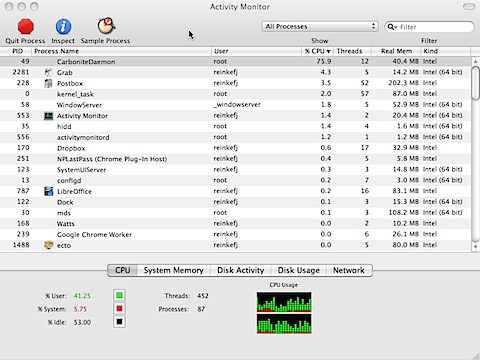
comment=Carbonite is absorbing 75% of the CPU. Is this the reason my macbookair slows down to a crawl periodically.

serial=212XXXXXXXX

==================== application File Attachment ====================

CarboniteLog.zip, 1436252 bytes, added to incident

# # # # #

>

> Question Reference #110301-001874

> Date Created: 03/01/2011 02:56 PM

>

> [—001:002431:43220—]

# # # # #


SERVICE: CARBONITE client absorbs 75% of the cpu

Tuesday, March 1, 2011

201103011455.jpg

Argh!

# # # # # posted 2011-03-01 14:56


SERVICE: CAREMARK is robotic and uncaring.

Saturday, February 26, 2011

FOUND THIS IN THEIR EMAIL BOX THIS MORNING

in response to my simple message: “My wife, Evlynn, is dying in Saint Peters Hospital. It’s now inevitable. Please stop ALL RXs.

# – # – #

From
Caremark Customer Service
To
EVLYNN REINKE
Date Sent
02/25/2011
Subject
RE: Other – Other (Call Us, Better You, Corp) – ZBA21
Message

Your Unique Tracking ID is: 493432

Dear Plan Member:

Thank you for contacting CVS Caremark. We strive to provide quality customer care to every one of our plan participants.

All pending orders have been canceled per your request. Thank you for allowing CVS Caremark the opportunity to be of assistance.

Should you need additional assistance, please respond to this e-mail or you may contact Customer Service at 1-800-701-5833. We appreciate the opportunity to serve all of your prescription benefit needs and to help you better manage your health.

Regards,

Brandon M.

CVS Caremark
Web Support

This e-mail communication and any attachments may contain confidential and/or privileged information for the use of the designated recipients named above. If you are not the intended recipient, you are hereby notified that you have received this communication in error and any review, disclosure, dissemination, distribution, or copying of it or its content is prohibited. If you have received this communication in error, please notify the sender immediately by telephone and destroy all copies of this communication and any attachments.

Coming Soon!

The New Caremark.com

Always working hard to make things easier for CVS Caremark members, we will be launching a new and improved site soon! The new Caremark.com has simplified and enhanced the features of the current site to make getting your prescriptions, finding savings, and learning about your medications even easier. Get a preview of the new Caremark.com at http://www.caremarkrelaunch.com/”>< a=””> face=”Arial, Helvetica, sans-serif” size=2>www.caremarkrelaunch.com<>.

— Original Message —
From: EVLYNN REINKE_76299229 <SecureOutboundEmail@caremark.com>
Received: 2/25/11 12:24:55 PM CST
To: Caremark Customer Service <customercare@advancerx.com>
Subject: PSDCSV: [CVS-76299229:76299229:902966664:APCS]

INFORMATION SUBMITTED FROM WEB FORM
———————————–
Email Address = evlynn@reinke.cc
Question Subject = Other – Other (Call Us, Better You, Corp) – ZBA21
Question Type = Customer Service
Portal logged-in =
Group Code = ZBA21
Name = EVLYNN REINKE
Member Id = 902966664
Contact Me = Yes
Phone = 908-209-3625
Benefit Question =
Address Line 1 =
Address Line 2 =
City =
State =
Zip Code =
Plus 4 =
How did you hear about us =
You are =
Question:
My wife, Evlynn, is dying in Saint Peters Hospital. It’s now inevitable. Please stop ALL RXs. Thanks, fjohn reinke
———————————–


# – # – #

Argh! Doesn’t anyone really think about what they are doing? Do they really think we are fooled by this “caring” email? And, what about all the “barbara streisand” in and around it?

Finally, can they make the font any smaller?

Argh!

# # # # #


HARDWARE: Thermostat absurdity

Saturday, February 26, 2011

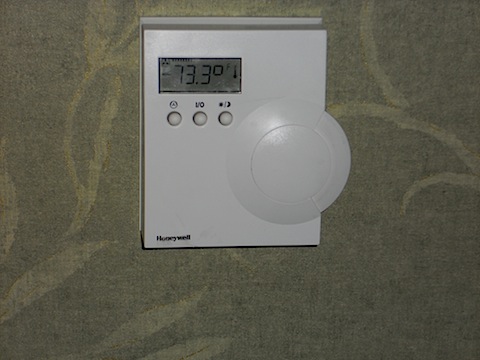
DSCN0021

OK, here’s a hospital room thermostat. It’s cold in the room. How do I make it warmer? Or, colder.

Those three buttons must DO something, I feel like I’ve been dropped into a future civilization. Or stuff changes, and I didn’t get the memo.

How about a big + and – sign?

Argh!

# # # # # posted 2011-02-26 03:28


MACBOOKAIR: AddressBookSync is taking 98% of the CPU?

Thursday, February 24, 2011

AddressBookSync is taking 98% of the CPU?

I have “sync” set to manual. What’s up with that?

# # # # # posted 2011-02-24 07:28


MACBOOKAIR: Out of space condition

Thursday, February 24, 2011

POSTBOX2 and CHROME running. Zero free space. Reboot. 7 Gig free. Argh!

# # # # # posted 2011-02-24 07:18


SERVICE: Cute little video about calling via GMAIL

Wednesday, February 23, 2011

http://googlevoiceblog.blogspot.com/2010/08/make-and-receive-calls-in-gmail.html

*** begin quote ***

We’re rolling out this feature to U.S. based Gmail users over the next few days, so you’ll be ready to get started once “Call Phones” shows up in your chat list (you will need to install the voice and video plug-in if you haven’t already). If you’re using Google Apps for your school or business, then you won’t see it quite yet. We’re working on making this available more broadly – so stay tuned!

*** end quote ***

[JR: Lotta times I see them announce stuff and it is not there. Hmmm?]

# # # # #


TECHNOLOGY: Having one is really having none

Monday, February 21, 2011

http://artofmanliness.com/2010/11/15/the-10-essentials-for-outdoor-adventures/

The 10 Essentials for Outdoor Adventures
by CHRIS on NOVEMBER 15, 2010

*** begin quote ***

Navigation: As mentioned above, the navigation system could include traditional forms of orienteering such as a good topographic map of the area you are in and a compass, or it could include a GPS unit. Just remember, should you choose to rely solely on GPS, you put yourself at risk of poor signal coverage, dead batteries, water damage, and other mishaps that could leave you without a navigational aid.

*** end quote ***

In the tin foil hat TEOTWAWKI (The End Of The World As We Know It) crowd, there is a very relevant expression:

“Having one is really having none.”

First heard that in the USAF Survival School. And, having done that two weeks of hell on earth, I can attest that in every field exercise, every man had TWO compasses. True the secondary one, your eye sight better be good to read it. But there was TWO.

Two ways to make a fire. Two knives — one big and one small. Two canteens — one which was required to always be full and secured to your personal belt. Your only excuse for losing that belt was to be sawed in half.

And, you certainly didn’t want to fail that course and have to repeat it if you were lucky. Otherwise, you were scratched and sent back to “personnel”. Euphemistically call “Human Resource Assignments”. There was always a need for garbagemen, grease trap cleaners, or “weeds ‘n’ seeds”. (We were told that one flunk out was sent to do gardening at “Than Sue Nutt, VeitNam, Republic of”! But we thought that was a fairy tale to scare us. Since we all had our next stations assignments, it did. If I’d have flunked, I’d have lost my gig in Maryland. Sweet.)

SO I have a quibble with the navigation advice, one GPS and TWO compasses and one analog watch, are the minimum.

# # # # #