MACBOOKAIR: Online, but not back to where I was

Saturday, December 11, 2010

OK, it came back from Apple wiped.

❶ Lost the Snow Lepord OSX, Iworks, and Ilife upgrade. Have to find the distribution disks. (That was last year. Know how much stuff has flowed under the proverbial bridge?)

❷ CARBONITE did its job. All my data is back. (Not software. Ouch!)

❸ DROPBOX put an extra data backup in its folder. (Data back up redundancy. Love it.)

❹ GOFLEX drive did NOT back up the applications directory. (ARGH! Not recommending that any time soon.)

❺ What ever clipboard manager I was happily using B.A. (before Apple mucked it) is lost in the mists of memory. (Note to self: keep your own manifest of what’s on the machine! Argh!)

❻ Dumped Apple’s lame MAIL Client. Deployed THUNDERBIRD3. (PIA to redefine all those accounts. Would have had to do it for APPLEMAIL. So bite the bullet.)

❼ Blogs have been neglected and irregular during this adventure.

❽ Old APPLEMAIL archives are “lost”. Argh!

❾ Oh, and thanks Apple for the “Thanks for purchasing your Mac.” message. Argh!

❿ Old system of accounts on the MACBOOKAIR is wiped. Guess I’ll just forget about “separation” of USER and ADMINISTRATOR roles. Argh!

The adventure continues.

p.s., I dumped APPLE’s software for Open Office.

p.p.s., Started a “manifest” of stuff I put on like NVU.

Argh!

# # # # # posted 2010-12-11 09:05


MACBOOKAIR: So much for Apple’s vaunted service

Saturday, November 27, 2010

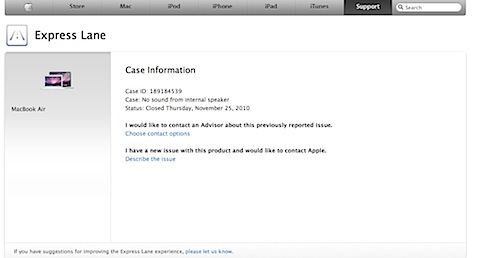
201011271138.jpg

Case close. Broken hardware (maybe? probably?) But “closed” from their POV. Not mine.

Now you see why it’s “NOTRECOMMENDED”?

Like DELL, I think they are living of reputation.

# # # # # posted 2010-11-27 11:38


MACBOOKAIR: Hardware problem. (Remember Apple Computers are on my “Not Recommended” list)

Friday, November 26, 2010

“No output sound devices defined” (No input either.)

Conclusion after ½ on the phone is it’s a hardware problem.

NOO, really!

Argh!

They want me to leave the machine for three days for them to diag, order parts, and repair.

You gotta be kidding me.

Or, I can send it in and this is with the extended warranty.

Argh!

This is for a machine that won’t sync. (They never figured that one out either.)

Hence my time machine is a giant router in disguise. That’s all it is good for.

Argh!

BAck when I first got the machine and wasn’t totally “on” it, the screen took a week to replace.

Cloud computing, with all it’s version control issues, is looking better and better.

Argh!

# # # # # posted 2010-11-26 15:34


MACBOOKAIR: OSX 10.6.5 applied

Saturday, November 13, 2010

Update applied. Big one. Reboot required. We’ll see.

Sound still broken.

Assume sharing is still broken.

Argh! Have to consider “bare metal restore”.

# # # # # posted 2010-11-13 09:53


MCBA: MacBookAir (old one) loses sound

Sunday, October 31, 2010

For no apparent reason, there is no sound on the McBa. The volume controls on the keyboard don’t work. And in the system preferences | sound, there are no output devices defined.

The only help I can find online says to run the permission fixer, which I did to no avail.

Argh!

So much for Apple’s reputation of “bulletproof-ness”. I go get this on a Windoze machine.

Time for a bare metal restore?

But I’ll lose all my email archives.

Argh!

# # # # #


MCBA: Taking Macs off my recommended list

Friday, December 5, 2008

For all the griping about Microsoft and its problems with Operating Systems, Apple is rapidly moving into the same class. There is a very annoying problem that arrived with a required update. Now every so often the Mac Book Air stops working while it rescans and reconnects to the WiFi Access Point.

Browsing the web shows that this has been a problem since the First Quarter of this year.

Argh!

Don’t buy Microsoft or Apple. Bite the bullet and go directly to Linux. At least, when you have a problem, you’ll know you are on your own!

# # # # #


MCBA: Excessive Airport Scanning after 10.5.2

Friday, November 28, 2008

Re: Excessive Airport Scanning after 10.5.2

Posted: Nov 23, 2008 11:01 AM in response to: Gregory Vonderh…

*** begin quote ***

Glad to know I’m not alone. Slight comfort. I almost bought a new AP thinking that had to be the problem. Of course, this has only happened since the OS update. I never had a problem prior to that. None of the subsequent updates have helped, either. Getting rid of the airport status in the menu bar has only helped in that I don’t constantly see black bars fade to completely ghosted every 30 seconds. I’m hoping that this issue is resolved soon. It’s beyond maddening.

*** end quote ***

I’m also having the problem. Argh!
# # # # #


MACBOOKAIR: Apple’s MOBILEME seems to be working

Thursday, July 17, 2008

http://web.mac.com/reinkefj/Site/Blog/Blog.html

I’ve been putting my McBa use items here.

# # # # #


McBookaire: Stupidity is a good way to leave yourself without power.

Friday, June 27, 2008

Last night, didn’t notice the plug was out and McBa was sitting in hibernate. Today noticed it. Battery is under a quarter. Wonder what happens when it goes flat? Any way, cant take it with me today to doc office because it’s so low. Maybe that is a design problem. It should shutdown after hibernate for say an hour?

# # # # #


McBookAir: McBa gets a real field trial

Thursday, June 19, 2008

Up to now, McBa has always been close to LUGGABLE. For passwords, for files, for the ‘chuck it moments’. Now we are going to work it away from LUGGABLE, More than a day away. Many mies away. Here’s a real field trial. We’ll see.

# # # # #

Powered by Bleezer