HARDWARE: Remembering a hardware failure; not so fondly

Sunday, April 27, 2025

https://www.makeuseof.com/thread/what-was-your-worst-data-loss-disaster/?utm_medium=newsletter&utm_campaign=MUO-202504240800&utm_source=MUO-NL&user=cmVpbmtlZmpAZ21haWwuY29t&lctg=7e6c3cd411d6a815afa18582d54bd455914c43c5f69df1448b8ec20ee4959f71

What Was Your Worst Data Loss Disaster?

Ben Stegner

1 day ago

<< EDITOR ADDED DATE 2025-04-24>>

# – # – # – # – # 

MY REPSONSE

Back in the Wild West days of corporate computing, II used to have my own back up solution. Brought and paid for myself. It was a zip drive. Remeber good old Iomega devices. It was 10 megs that I controlled. Had my own program that I wrote in COBOL (shows you how long ago that was). Worked fine thru several IBM Thinkpad hard disk failures. Sigh!

Anyway some genious decided that there should be no foreign devices on the corporate network, All USB ports would be locked, All computers in the Window NT domain would be backed up by the domain admin team. Even floppy disks were prohibited and locked.  

Having no choice, I did a lot of printing of stuff fo take home and emailing copies of working documents to a coworker and visa verse.

For about six months everything was fine. Then predictably my “workstation” that Thinkpad disk drive failed. Support dutifully replaced it and reinstalled the Operating System and started a restore from “Headquarters”.

Guess they never met Murphy.

Of course, I was idled for the better part of two days with about 50 meg of data “sped” down the undersized corporate network. Due dates be dammed. My status reports were on sentence. “Computer failed; Restore in progress; ETTR unknown.”

So it finally finished up after three DAYS, And NIGHTS! I sit down an logon. Guess what happens next? “File not found”, “File corrupt”. Another two days of “techincal magic” and everything now appears to work.

Go to open my latest — now behind schedule — “urgent” report. “File not found”.

I do a quick look and the back up data is SIX MONTHS old.

Apparent after great “STURM UND DRANG” we find out that the corporate backup system had never worked.  

I do a not so quick inventory of my paper files that I had at home. And there is SOME stuff but not everything. (I was a very inefficient clerk. Especially when I am very annoyed.)

Leadership told me to “Stop Bitching” and “deal with it”. 

Apparently, the various executives were going thru

# – # – # – # – # 

Webform has — I guess  —  a size limit 

# – # – # – # – # 

Apparently, the various executives were going thru a similar “experience”.  

I presume that they were not diligent about the corporate diktat that there was to be no “personal” data kept on “corporate computers”.

Never found out the full impact of the disaster.

But soon after IT leadership left for “other opportunities” and who bunch of “IT diktats” changed.

Laugh!

I too left soon after for a better opportunity and more money. Laugh!

About a year later the company was acquired and their IT was “absorbed” with a huge layoff.

I don’t know if the two are related.

Never looked back.

# – # – # – # – # 

Thought this was a interesting memory.

Argh! Argh! Sigh!

—30—


CHROMEBOOK: This is a fraud and I’m surprised at WalMart

Monday, August 21, 2023

https://www.androidauthority.com/expired-chromebooks-on-sale-3352831/?utm_campaign=weeklyauthority&utm_medium=email&utm_source=newsletter&utm_term=Weekly%20Authority

Computing
You shouldn’t buy these Chromebooks, even on sale

  • Thanks to Automatic Update Expiration, these Chromebooks will no longer receive any software updates.

By Aamir Siddiqui  —  August 7, 2023

*** begin quote ***

The US Public Interest Research Group (PIRG) (via ArsTechnica) pointed out how end-of-life Chromebooks are still sold on various marketplace platforms, like Amazon, Walmart, and possibly others, in new and unused conditions. These include devices like the ASUS Chromebook Flip C302, which was launched in 2018 and reached its Automatic Update Expiration (AUE) date on June 1, 2023. This means the laptop will no longer receive any security or platform updates for its Chrome OS from Google.

*** end quote ***

Google maintains a full list of AUE dates for all models.

Please check BEFORE you buy!

—30—


HARDWARE: NO folding phones for me

Thursday, June 29, 2023

https://arstechnica.com/google/2023/06/rip-to-my-pixel-fold-dead-after-four-days/#p3

Sorry — RIP to my Pixel Fold: Dead after four days

  • The closed display halves almost touch, and that can smash debris into the screen.

Ron Amadeo – 6/26/2023, 1:00 PM

*** begin quote ***

Manufacturers keep wanting to brush off the significant durability issues of flexible OLED displays, thinking that if they just shove the devices onto the market, everything will work out. That hasn’t been the case, though, and any time you see a foldable phone for sale, you don’t have to look far to see reports of dead displays. I’m sure we’ll see several reports of broken Pixel Folds once the unit hits the general public. Corning may save us with an exterior foldable glass cover, but until then, buying any foldable feels like a gamble.

The scary part for Google customers is that a broken Pixel Fold means dealing with the company’s notoriously unhelpful support team. Horror stories are a regular occurrence on the /r/GooglePixel subreddit, where users have called Google Support “hilariously incompetent” and a “nightmare” to deal with, begging the company to improve. It’s one thing to ship normal glass smartphones, but these fragile foldables will put more stress on Google’s support network.

*** end quote ***

I’ve always been suspect of “foldable” phones.  Not the old ones but the new ones that promise a “big” screen from a “small” footprint.

Just ain’t going to happen IRL of rough and tumble.

—30—


HARDWARE: Put EPSON on my “never purchase” list

Sunday, August 21, 2022

https://hardware.slashdot.org/story/22/08/11/181230/bricked-epson-printers-make-a-strong-case-for-user-repairability?utm_source=rss1.0moreanon&utm_medium=feed

Bricked Epson Printers Make a Strong Case For User Repairability

*** begin quote ***

Epson has gained some scrutiny in recent weeks after the company disabled a printer that was otherwise working fine, leading to accusations of planned obsolescence. Epson knows its printers will stop working without simple maintenance at a predictable point in the future, and it knows that it won’t be cost-effective for many owners to send their home printers in for service. So why not build them to be user serviceable in the first place? The Verge:

The inciting post from @marktavern mentions that his wife was unable to use her “very expensive Epson printer” after an end-of-service error message appeared. This isn’t anything new for Epson printers, sadly. Reports going back several years mention an infamous error message that reads “parts inside the printer have reached the end of their service life.” Epson confirmed to The Verge that the error is related to the printer’s ink pads, which had likely become saturated through extended use and were now at risk of spilling into the rest of the printer mechanism.

*** end quote ***

Sounds like consumer fraud to me.  I never heard of such nonsense.

—30—


HARDWARE: iX1500 is neat recommended product based on the added support for external cloud services

Thursday, December 16, 2021

I have had the scanner for awhile.  While good, the cloud implementation to Fujitsu cloud was lame and timed out quickly.

After a complete reinstall after something melted down software-wise, I needed their tech support to walk me through the the process. 

Updated to all the latest “stuff”, I found that the device now supports external cloud services like dropbox, Evernote, etc etc!

So now a scan to the cloud goes right into the appropriate cloud vendor.

This displaces ADOBE’s scan on the iPhone, that wants a monthly subscription.

So all in all a good “update”.

—30—


HARDWARE: Apple spits in the face of “right to repair”!

Friday, October 1, 2021

https://www.reviewgeek.com/98982/ifixit-calls-the-iphone-13-a-new-low-for-repairability/

iFixit Calls the iPhone 13 “a New Low” for Repairability
ANDREW HEINZMAN @andrew_andrew__
SEP 27, 2021, 5:48 PM EDT | 1 min read

*** begin quote ***

As Right to Repair legislation garners support from both sides of the political aisle, Apple is doubling down on its anti-consumer practices. A now-complete teardown from iFixit shows that the iPhone 13 reaches “a new low” for repairability, as it’s effectively impossible to repair at home without losing key features like Face ID.

*** end quote ***

Way to lock in the consumer.

—30—


HARDWARE: Chromebook versus Apple care

Monday, September 20, 2021

My experience with getting my ROSE Mac book air repaired continues. 

Yeah, I spilled coffee on it — thanks Dunkin Donuts — and I sent it in and paid for repair — spills not covered by Apple Care — back it came still broken.

Just went thru the process again because the box got lost. Argh!

I’m going to chrome books completely.  When they break you just recycle them.  Argh!

My fiancé’s chrome book broke down and I had her back in operation in less than a day.  Most of the time was to drive to Best Buy and pick up a new one. 

Chromebook = Appliance like “Toaster” where as the Mac Book Air is more like a cranky computer. Argh!

—30—


HARDWARE: Do as I say; not as I do

Sunday, April 4, 2021

Argh!

OK, I have put my coffee tray on my truck set many many times.

Today, it cost me when I spilt two large DD coffees on my seat.  

So was my laptop.

It appears that I now have a problem or three — sticky keys, a partially damaged screen, and some power issues.

New machine comes in tomorrow.

Reminds me of why I like CHROMEBOOKS.  Cheap and cloud based.

If only MARSEDIT would run on the CHROMEBOOK, then I’d have migrated completely years ago.

Oh well, live and learn!

Argh!

—30—


TECHNOLOGY: MAC OSX 11.01 on MacBook Air (M1, 2020) always has a problem waking up

Sunday, December 13, 2020

MacBookAir (M1 2020)

# – # – # – # – #

TECHNOLOGY: MAC OSX 11.01 on MacBook Air (M1, 2020) always has a problem waking up.

# – # – # – # – #

You would think that Apple is getting overwhelmed my automatic reports?

—30—


CHROMEBOOK: LaCros “fixes” “end of life” on Chromebooks?

Monday, September 14, 2020

https://www.chromestory.com/2020/09/multi-profile-chrome-on-chromebook/?unapproved=75469&moderation-hash=0ed8311875f1f816bf51ad759e8d4a8f#comment-75469

LaCros Will Change the Way We Use Chromebook
September 12, 2020 by Dinsan Francis | Last Modified: September 12, 2020 

*** begin quote ***

It will stop getting updates when your Chromebook reaches end of life.

Using a browser that no longer gets software updates is not a safe thing to do. With this change, Google can continue to give you Chrome updates even after stopping support for Chrome OS on your Chromebook.

But that’s not what I am excited about

I use two Chrome profiles on my Mac. One has my personal account. The second profile has the Google account that I use for the blog (Analytics and Search Console, etc).

Whenever I have to switch between these two profiles to complete tasks, I tend to use my Mac. It is not easy to do this on a Chromebook. I cannot switch profiles as I do on my Mac or Windows PC.

*** end quote ***

# – # – # – # – #

Maybe I don’t understand the need for “End of Life” on Chromebooks. I’ve discarded two as my secondary machine to my primary Mac Book Air. I’d have thought that Google had created the computer that was closest to an appliance like a toaster. But they threw in the EOL as planned obsolesce. Such a shame, because the EOL ones still work.

I never saw a need for “profiles”.

—30—


HARDWARE: Can’t find a better mouse

Sunday, August 19, 2018

Wireless Mouse with Nano receiver (Black) An Amazon Brand.

My fiancé needs a mouse; she hates trackpads.  She uses a CHROMEBOOK; as you know I’m a big fan of them.  This mouse just works for us.

p.s., My cockatoo lives it too, unfortunately. But at $10, it’s a lot cheaper than my MACBOOKAIR’s power cable.

— 30 —


CHROMEBOOK: “Planned Obsolescence” or “End Of Life”

Friday, June 8, 2018

One of my beloved Chromebooks — ET101 Samsung — updated the Chrome OS and popped up an “End Of Life” message.

What?

It’s EOL when it dies.

Is this part of Google’s attempt to follow in Apple’s “planned obsolesce” “architecture”?

Personally, if the Chromebook is supposed to be the “toaster” appliance of the computer age, then it should old go “end of life” when it goes to chromebook heaven.  I have toasters that lasted until the lady of the house decided the exterior could no longer be clean enough.  Not my problem, but an example of “Western Electric” telephone handset engineering.  Capable of operating after a flood or a nuke.

I am very upset.

And as if to rub my nose it (i.e., EOL), google helpfully offers me a selection of upgrades.

ARGH cubed!

— 30 —

http://www.dailymail.co.uk/sciencetech/article-5819169/Apple-hits-claims-designs-iPhones-fail-force-consumers-buy-new-one.

‘Planned obsolescence is the craziest thinking in the world’: Apple hits back at claims it designs iPhones to fail so consumers have to buy a new one

  • VP of marketing Greg Joswiak refuted that Apple uses ‘planned obsolescence’
  • In an interview with noted Apple blogger John Gruber, he called those claims ‘about the craziest thinking in the world’ saying the firm wouldn’t do that
  • Joswiak said Apple paid special attention to older devices with iOs 12 update
  • Comments come as Apple gave customers discounts for battery throttling
  • Apple has been charging £25 ($29) for replacements since December

By AARON BROWN and ANNIE PALMER FOR DAILYMAIL.COM
PUBLISHED: 19:07 EDT, 7 June 2018 | UPDATED: 19:18 EDT, 7 June 2018

* * * * *

Yeah, right.  I believe that!

–30–


HARDWARE: Drone on drone action

Friday, December 23, 2016

https://youtu.be/32IPBmcwplQ

This makes me want to get one

####


HARDWARE: My first night with a BPAP machine

Sunday, October 30, 2016

For those that know me, I don’t sleep well. And, evidently, I was getting worse.

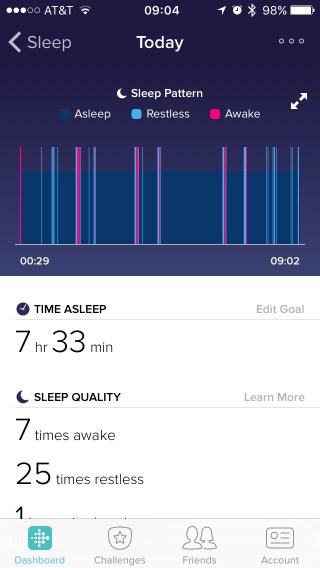
I bought a FITBIT Surge for the “sleep stats” it would give me. Being an ingineer, I like “evidence based” decisions.

The initial results were troubling — 100+ steps in my sleep, terrible awake / restless numbers, and the “heart rate” was in the 80 to 120 range. The pattern continued.

FITBIT  1  1FITBIT  1

So off to the doc I went.

After an initial visit and screening, a sleep study was ordered.

(Giant PIA)

That reported that I had very bad sleep apnea where I was over “60”. That meant I was breathing 60+ times per hour. (That’s scary!)

http://www.mayoclinic.org/diseases-conditions/sleep-apnea/basics/definition/con-20020286

So a machine was ordered. 

I was pretty skeptical until a friend related her relative’s experience — untreated, diagnosed later with a n enlarged heart due to the struggle to supply oxygenated blood to the body, he went on to heart problems with a long list of drugs, complications, and hospitalizations, leading to eventual death from a heart attack.

That got my attention.

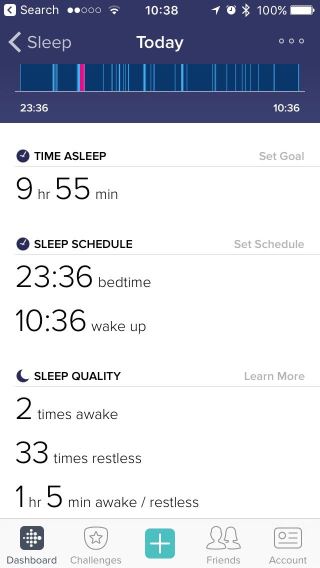
So, what were my “results” from the first night?

2016 10Oct 27 FITBIT  12016 10Oct 27 FITBIT  2

I’d say that was a dramatic improvement.

I’d agree that having a “headset on your nose” is a “pain in the a double q”, but it seems worthwhile.

SO, for those that snore, here’s some anecdotal evidence that you should look into it further.

# – # – # – # – # 


HARDWARE: Safety jewelry

Monday, September 19, 2016

http://www.roarforgood.com/

“Smart safety jewelry designed to help reduce assaults”

# – # – # – # – # 

$100 pre release.

A little pricy, but it may be a lifesaver.

Marketed to women, but maybe should be for children?

Interested in opinions?

# – # – # – # – # 


HARDWARE: Maybe a fix for WiFi’s poor performance?

Tuesday, March 1, 2016

http://fortune.com/2016/02/23/eero-home-networking-review/

Struggle with Wi-Fi speeds and coverage in your home? Eero has the answer.

*** begin quote ***

A year ago, startup Eero surfaced with a bold claim: It had developed a product that would fix Wi-Fi in our homes. Using a series of small white boxes, Eero would create a smart network capable of providing a consistent connection to Wi-Fi hungry devices throughout your home.

*** end quote ***

Steep price for a better experience.

One thing is for sure the current crop of wireless routers provided by ISPs are all no bargain.

I have FIOS, Optimum, and TWC. Gal pal has another optimum setup.

Performance is AT BEST less than perfect; in Gal Pal’s case almost unusable.

She is much less demanding and much more tolerant of the flaws than I am.

My standard is I pay to use it; not work around it, debug it, and reset things.

Argh!

Maybe I should go back to IT leadership as a career. At least, I might be able to fix the Customer experience?

# – # – # – # – # 


HARDWARE: iPhone Power Cord pet peeve

Monday, February 22, 2016

http://www.instructables.com/id/IPhone-Power-Cord-Protection-With-Shrink-Tubing/

iPhone Power Cord Protection With Shrink Tubing

*** begin quote ***

The iPhone is a significant investment but the power cord is surprisingly vulnerable to kinks and tears. To protect against this I applied a two inch length of shrink tubing. This serves to reinforce the collar.

*** end quote ***

Pet peeve.

Every Apple cord has this type of damage.

(Except for the brand new one I have that I haven’t used yet. Argh!)

More than their resistance to break their security, how about they put another penny in to the cords?

Double Argh!

# – # – # – # – # 


HARDWARE: In praise of Chromebooks and Chromeboxes

Wednesday, September 16, 2015

From FACEBOOK

{Privacy Invoked} #1 · Seaside Heights, NJ · 

Ok Facebook world. My laptop died but it is IMPERATIVE that I have a computer, I’m in Grad school. Is a Chromebook good enough for writing papers, printing out papers coupons and the like and surging the web? I’ll b using a flash drive or google docs too. Help!?!

# – # – #

FJohn Reinke

I have several. I use them for most computing chores. Bought one for {Privacy Invoked} as a gift to replace her old windoze box. She loves it.

  • As long as you use the cloud and the inet, it’s perfect for light weight computing use.
     
  • Cheap. I’ve seen them as low as 199. 
     
  • By using the cloud, you’re forced to keep your data backed up.
     
  • Should you lose it, destroy it, or have it stolen, it’s trivial to get a new one and not miss a beat.
     
  • Also no malware can infect you.

# – # – #

{Privacy Invoked} #2

We have chrome books, Windows desktop and MacBooks. All are good. But, you can only save to the cloud on a chromebook. So, if internet access is interrupted, you can’t get to your files. Also, it’s difficult to print from the chromebooks. I would suggest a Windows or Apple machine.

# – # – #

FJohn Reinke

You can add local storage via usbdrive or and sd card.

Also, many of the “apps” have an offline capability. 

I use google cloud printing capability even on my mac and windoze machines for universal printing (i.e., from anywhere to Virginia, Kendall Park, or Staples). 

Should not be a problem. Sign up for my “platinum support” plan and I can help you. The “gold” plan you get {Privacy Invoked}; “silver” {Privacy Invoked}; “bronze” {Privacy Invoked}; or “lead” {Privacy Invoked}. Laugh! 

Seriously, chromebooks are the way to go for lightweight computing. And, most smartphones allow you to tether them for universal inet access. 

I have Optimum at 51F and that gives me access to Optimum wifi. Most inet service providers have that capability. McDonalds, Starbucks, and Panera have free wifi too. 

I like chromebooks for their utility and no required complete refreshes / reinstalls every so often as windoze and mac get “crud build up”.

Lot positive to be said for the Chromebook / Chromebox. I usually leave one in 51F for {Privacy Invoked} to use when we’re there.

# – # – # – # – # 

So let’s sum it up: cheap; simple; and worry free.

I laughed when some clowns hijacked a truck of about 1,200 MacBook Airs destined for a school worth more than a million bucks. 

http://www.foxnews.com/tech/2015/09/03/4-men-accused-stealing-nearly-1200-student-laptops/

This revealed the waste at Gooferment Skrules that the taxpayers are paying for.

Argh!

# – # – # – # – # 


HARDWARE: Use Google Voice instead of your cell phone number

Tuesday, August 4, 2015

Found another useful reason to use Google Voice instead of your cell phone number.

(Remember, the last tip was for young ladies to give men their GV# so that they can automagically delete them if they turn out to be a loser.)

This tip is as a result of my Gal Pal’s blackberry going crazy. It’s essentially useless and she has no way to let folks know it. So she’s using my phone to alert folks.

IF she had used a Google Voice number and tied that to her cell phone, she could respond on the GV website and even send out an alert that she had a harder problem.

Interesting.

I think it’s very useful.

# – # – # – # – # 


HARWARE: IPHONE5 IOS8.1.2 active “screwy”

Friday, January 16, 2015

Interesting.

IPHONE5 IOS 8.1.2

Magically “Do not disturb” was set.

Also, Message Version 8.0 (4725) on Mac OS X 10.1.1 (14B25) stopped echo text messaged received on my IPHONE.

It’s like everything in Apple land has “lost their minds”.

?

# – # – # – # – # 


HARDWARE: LIVESCRIBE still not recommended

Monday, January 12, 2015

http://www.livescribe.com/en-us/

I’ve been using it primarily for work to move meeting notes from paper to email.

  • the capacitive top’s rubber falls off; sometimes the whole top is lost
  • the quality of the writing that comes from the pen is poor at best
  • the recognition of handwriting to text has never materialized
  • the integration with EVERNOTE is worse with the new pens versus the old versions
  • the opening of a new volume is cumbersome at best
  • the iPhone client is annoyingly slow
  • iPhone client forwards the notes as a jpg 

As soon as I can cost effectively move to either the Samsung Note or the iPhone6+ with the handwriting recognition, I will.

This then goes in the technology dust bin of mistakes.

# – # – # – # – # 


HARDWARE: Used the “lost phone” mode on Apple with iCloud — flawlessly

Saturday, January 10, 2015

RE: Lost Mode enabled on 571-xxx-xxxx

locked-nolocation_iphone__2x.png

Lost Mode enabled on 571-xxx-xxxx.

This device was put into Lost Mode at 5:14 PM on January 5, 2015.


Use Find My iPhone on an iOS device or visit icloud.com/find on a Mac or PC to take additional action.

# – # – #

571-xxx-xxxx was found near 3124 Route #27 Kendall Park, NJ 08824 at 5:14 PM.
Your iPhone’s last reported location will be available for 24 hours.

# – # – # – # – # 


HARDWARE: Keurig machines have security and a design flaw

Thursday, December 18, 2014

http://hackaday.com/2014/12/10/dead-simple-hack-allows-for-rebel-keurig-k-cups/

DEAD SIMPLE HACK ALLOWS FOR “REBEL” KEURIG K-CUPS
by: Rick Osgood
December 10, 2014  

*** begin quote ***

Unfortunately newer versions of these machines have a sort of DRM, or lockout chip. In order to prevent unofficial k-cups from being manufactured and sold, the Keurig machines have a way to detect which cups are legitimate and which are counterfeit. It appears as though the machine identifies the lid specifically as being genuine.

It turns out this “lockout” technology is very simple to defeat. All one needs to do is cut the lid off of a legitimate Keurig k-cup and place it on top of your counterfeit cup. The system will read the real lid and allow you to brew to your heart’s content. A more convenient solution involves cutting off just the small portion of the lid that contains the Keurig logo. This then gets taped directly to the Keurig machine itself. This way you can still easily replace the cups without having to fuss with the extra lid every time.

*** end quote ***

BUT, (and there is always a BIG butt), after the big “bio film” revelation that Keurigs are “un clean able”, why would anyone buy one?

Ewww, yucky!

And, who know what breeds in that bio film contaminated water reserve — the green meanies?

# – # – # – # – #   


HARDWARE: FIOS router required a reboot this morning

Sunday, December 7, 2014

2014-Dec-07

Last used around 5PM on Saturday 2014-Dec-06

Found unresponsive around 1AM on Sunday 2014-Dec-07

Went to backup to do my chore.

Rebooted at 2014-Dec-07 0824

Return to normal.

Strange. Usually rock solid.

# – # – # – # – #   


HARDWARE: Russian Plane Zaps U.S. Warship

Friday, November 21, 2014

http://www.lewrockwell.com/2014/11/gary-north/russian-plane-disabled-us-warships-missile-defense-system/

A Russian Plane Zaps U.S. Warship’s Missile Defense System
By Gary North
The Tea Party Economist
November 14, 2014

*** begin quote ***

An unarmed Russian bomber in April flew over a high-tech U.S. ship. A crew member pressed a button. Poof! No more missile defense system on the ship. No more radar. The ship became a defenseless floating coffin.

Then the plane flew over the blind ship a dozen times. Basically, it was “Nyah, nyah, nyah.”

This story got no play in American media.

*** end quote ***

So, we are sitting ducks again.

Anyone remember Pearl Harbor?

# – # – # – # – #   


HARDWARE: I could have used this in 1964

Sunday, October 12, 2014

http://www.instructables.com/id/Street-Sweep-Alert/

FILWFGSHYZX0798 MEDIUM 

*** begin quote ***

The Street Sweep Saver is an alarm that rings 10 minutes before street sweeping begins on your block. The alarm is made with an electric bell controlled by a beagle bone black board. I designed a wooden casing that hides the electronics. Mount the Street Sweep Saver to your wall or place it on your kitchen table next to your daily cup of joe.

*** end quote ***

Argh!

A few decades too late.

I received so many parking tickets in my youth from alternate side of the street parking!

Most of them were written by the same cop. I think his name was Krupick.

I deserved most of them. 

But, several were written at 7:01 AM and I called the police station at 6:45 to complain.

It didn’t help. The deck was stacked.

That’s when I became anti-Gooferment!

# – # – # – # – #