Saturday, February 20, 2016
http://www.france24.com/en/20160219-usa-apple-plays-digital-privacy-hardball-with-fbi-but-not-china
Business – Apple plays digital privacy hardball with FBI, ‘but not China’ – France 24
*** begin quote ***
Apple was hailed as a champion of digital privacy this week after refusing to help the FBI hack into an iPhone belonging to a suspect in the San Bernardino shooting. But the firm hasn’t always been so scrupulous about user data, especially in China.
*** end quote ***
FURTHER undermining the Apple argument!
# – # – # – # – #
 Leave a Comment » |
  SECURITY |
  Permalink
 Posted by reinkefj
Saturday, February 20, 2016
| Hi FJohn, |
| |
|
|
| At LinkedIn, we’re always looking for ways to make your professional life better. This sometimes means shutting down certain features that aren’t heavily used to invest in others that offer value for our members.
On February 25th we’ll be removing the ability to save new contacts and sort your contact list by saved contacts. We’ve migrated the contacts you’ve already saved to a tag called “Saved_ Contacts” so you won’t lose anything you’ve already stored. To access your saved contacts from the LinkedIn desktop site:
1. Go to “My Network” on the top navigation bar and select “Connections.” Scroll down to your Contacts list and click on the “Filter by” dropdown on the left.
2. Select “Tag.”
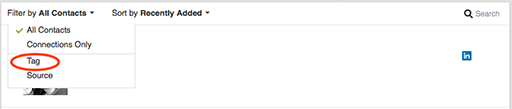
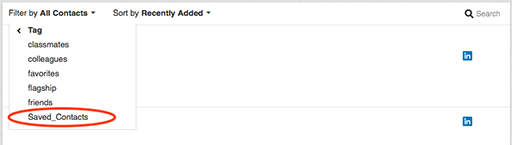
3. In addition to a list of tags you may have created you’ll find a newly added tag called “Saved_Contacts.” Click on this tag to display your previously saved contacts.
We apologize for any disruption or inconvenience this may cause. If you have any questions, please contact our Help Center.
Thanks for being a member,
The LinkedIn Team |
|
|
|
|
| |
| |
|
|
|
|
|
|
# – # – # – # – #
OK, I pay 500$/year and the change may negate what I use it for. Argh!
# – # – # – # – #
| Hi FJohn, |
| |
|
|
| At LinkedIn, we’re always looking for ways to make your professional life better. This sometimes means shutting down certain features that aren’t heavily used to invest in others that offer value for our members.
On February 25th we’ll be removing the ability to save new contacts and sort your contact list by saved contacts. We’ve migrated the contacts you’ve already saved to a tag called “Saved_ Contacts” so you won’t lose anything you’ve already stored. To access your saved contacts from the LinkedIn desktop site:
1. Go to “My Network” on the top navigation bar and select “Connections.” Scroll down to your Contacts list and click on the “Filter by” dropdown on the left.
2. Select “Tag.”
3. In addition to a list of tags you may have created you’ll find a newly added tag called “Saved_Contacts.” Click on this tag to display your previously saved contacts.
We apologize for any disruption or inconvenience this may cause. If you have any questions, please contact our Help Center.
Thanks for being a member,
The LinkedIn Team |
|
|
|
|
| |
| |
|
|
|
|
|
|
Leave a Comment » | CLOUD | Permalink
Posted by reinkefj











 Reinke Faces Life