ASUSNETBOOK: Still broken

Friday, December 17, 2010

• Found a site that told me how to edit the “<space>2” out of the Home Network name. (You know, that thing you can’t create without a more expensive version of WINDOZE7!)

• ASUSNETBOOK connected just fine to the SPUHIL wireless guest wifi. (Argh! So it’s only the definition of my main home wifi network, that is screwed up.)

• NO reply to the post I left on http://windows7forums.com/windows-7-networking/

• NO reply on the ASUS support board http://vip.asus.com/eservice/techmailstatus.aspx?ID=WTM20101217034352241&SID=

Argh!

# # # # # posted 2010-12-17 08:20


SERVICE: Google Bookmarks and Google Toolbar

Friday, December 17, 2010

In my new burst of “religion” … … I always “worshiped” at the “Church of Murphy” … as in “Murphy’s Law” … … (no disrespect intended; I let you know when I intend to be disrespectful. I usually “slouch”. That’s an inside joke with my fellow Prepsters.) … anyway, after the recent failure of my (NOTRECOMMENDED) Mac Book Air Version 1.1, I have been improving upon my paradigms, memes, as well as procedures and practices.

• Backing up bookmarks. Used to use XMARKS, but they went broke. Came back to life under LASTPASS, but the old free data was nuked. (Argh!) So, I pick GMARKS add in to FIREFOX3 which uses the GOOGLE_BOOKMARKS service, (no need to have too many moving parts and Google will always be my free friend. Won’t they?) But, I’m moving to CHROME from Firefox (It “swallowed the pig” too many times. Hogged memory. And THUNDERBIRD is on probation.) And I can figure out how to move my CHROME bookmarks into GOOGLE_BOOKMARKS. I’ve got the html export file but where’s the insert button. Help says to use the GOOGLE_TOOLBAR button. But that’s not on CHROME?

• GOOGLE_TOOLBAR is only for FIREFOX and INTERNETEXPLORER?

Ahh, such is life on the “bleeding edge”. Unfortunately, I did not think I was on that edge but six months back.

Argh!

# – # – #

Update: So being the smart fat old white guy injineer, I figured I’d just bring up FIREFOX, install the GOOGLE_TOOLBAR, and import the the file. Problem solved. And, I’d call it a “work around”. You know the joke about Omar the fat man’s tailor! “Just walk this way”. So, quick like a bunny, up goes FIREFOX, download the GOOGLE_TOOLBAR, install, restart. And SHAZAAM! No toolbar? Argh!

So I’m off to find another solution. Argh! I hate technology.

# # # # #


MACBOOKAIR: Still trying to come back to where I was

Thursday, December 16, 2010

• IPHOTO still broken.

• Pages, Keynote, and Numbers still down; looking for the <synonym for procreation> disks.

• Migrated off APPLEMAIL onto THUNDERBIRD.

• Migrated off FIREFOX onto CHROME.

# # # # # posted 2010-12-16 23:39


TECHNOLOGY: Different strokes for different folks; passwords too

Wednesday, December 15, 2010

http://www.pcworld.com/businesscenter/article/213392/gawker_media_hacked_warns_users_to_change_passwords.html

Dec 13, 2010 6:50 am

Gawker Media Hacked, Warns Users to Change Passwords

By Jeremy Kirk, IDG News

*** begin quote ***

E-mail addresses and password details for 200,000 registered users of Gawker Media websites are now circulating on peer-to-peer networks after a weekend hack attack. The company warned users to change their passwords — including on other sites, if they use the same passwords elsewhere.

*** end quote ***

Since I never use the same passwords for different sites, not my problem!

Clearly, most people don’t keep that discipline.

# # # # #


WINDOZE: Cobbling together a solution

Wednesday, December 15, 2010

On the NETBOOK (Asus Eepc), I have DROPBOX to echo my data directory around where needed. After the fiasco with MACBOOKAIR and the deletion of significant protions of the data directory, I decided to make a local copy of the data directory on each platform. This protects against the data loss again.

On the WINDOZE systems to do this I dragged two free utilities out of retirement. ((I expected to abandon WINDOZE but the NETBOOK was needed and it brought WINDOZE with it. Argh!)

So on each platform, I’ve created an ‘OLDBOX’ folder to backup ‘DROPBOX’. The initial copy was easy.

BUT, how do you keep it updated on a regular basis?

http://www.karenware.com/powertools/ptoad.asp#Download

http://www.karenware.com/powertools/ptreplicator.asp

KARENWARE has two FREE utilites that make this easy.

PTREPLICATOR allows you sync directories with all sorts of options. (If you leave it running.)

PTOAD is a once a day utility; it ensure that ‘stuff’ you defined gets run once per day. (If you leave it running.) So if you put it in the ‘STARTUP’ folder, it kicks off. If you reboot several times, it only runs once per day. Neat!

So problem solved that to some old friends.

######


TECHNOLOGY: “Jeopardy!” pits man versus machine

Tuesday, December 14, 2010

http://apnews.myway.com/article/20101214/D9K3LU500.html

‘Jeopardy!’ to pit humans against IBM machine
Dec 14, 7:12 AM (ET)
By DAVID BAUDER

*** begin quote ***

NEW YORK (AP) – The game show “Jeopardy!” will pit man versus machine this winter in a competition that will show how successful scientists are in creating a computer that can mimic human intelligence.

Two of the venerable game show’s most successful champions – Ken Jennings and Brad Rutter – will play two games against “Watson,” a computer program developed by IBM’s artificial intelligence team. The matches will be spread over three days that will air Feb. 14-16, the game show said on Tuesday.

The competition is reminiscent of when IBM developed a chess-playing computer to compete against chess champion Garry Kasparov in 1997.

*** end quote ***

Now this will demonstrate something interesting to me. I doubt it will make great TV.

What’s next?

I know a robot playing Wheel of Fortune.

A pair of robot playing the Newlywed Game is just sick. Reminds me of the Will Smith movie “I, Robot”.

# # # # #


MACOSX: Where’s the date?

Tuesday, December 14, 2010

I think that Apple’s ‘reputation’ is unwarranted. Here’s where I start to pull at some threads in the King’s ‘garment’.

OK, I wanted to know what today’s date was.

201012121621.jpg

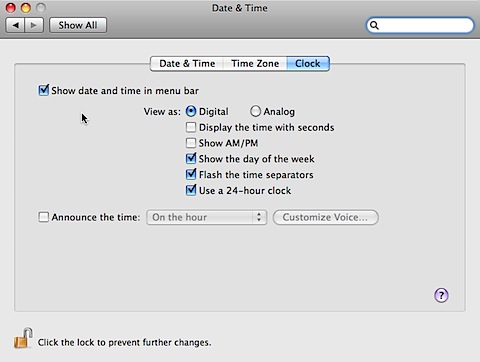
The screen tells me that it’s Sunday at 1620. But what’s the date? So I go to the ‘System Preferences’ screen and sure enough I’ve checked ‘Show date and time’.

201012121619.jpg

I see day and time, but no date.

An obvious oversight.

But, if this is obviously flubbed, makes you wonder what else is screwed up?

# # # # #


MACBOOKAIR: The factory wipe nuked OSX 10.6 and the package

Sunday, December 12, 2010

… and they want me to rebuy it!

(You have to be kidding.)

Argh!

They will replace Snow Leopard because the machine went in with it and came out without it.

But they want me to rebuy the iWorks and iLife!

Same logic should apply.

Argh!

I hate computers. And, their enablers.

It’s either a product and it’s all my responsibilities. Or, it’s licensed, and my serial number is all that I should need.

Argh!

Now, I gotta find those disks.

# # # # # posted 2010-12-12 16:04


MACBOOKAIR: Coming back slowly

Sunday, December 12, 2010

The adventure continues.

My DROPBOX strategy has a flaw. For some reason, a significant portion of my PDF files were deleted. (No idea why?) Clearly, sharing among machines is a winner. BUTT (there’s always a big but) I need a ‘vaulting strategy’. The deletion could have been disastrous. But, it took four hours to recover the files. And, I immediately made a copy. So, I need a synchronization strategy for each platform. Basically a synchronization utility that copies the latest files to the sharing directory and updates back in. Have to think about that.

“Manifests” for each machine are obviously needed. I have to start that now on the other platforms. Need to have the link to the source and possibly the last distribution.

Need a data review and archiving strategy.

In next year’s storage plan, I need to have it monthly archive.

No need to save all the ‘stuff’ I am saving. Argh!

# # # # # posted 2010-12-12 13:15


MACBOOKAIR: Online, but not back to where I was

Saturday, December 11, 2010

OK, it came back from Apple wiped.

❶ Lost the Snow Lepord OSX, Iworks, and Ilife upgrade. Have to find the distribution disks. (That was last year. Know how much stuff has flowed under the proverbial bridge?)

❷ CARBONITE did its job. All my data is back. (Not software. Ouch!)

❸ DROPBOX put an extra data backup in its folder. (Data back up redundancy. Love it.)

❹ GOFLEX drive did NOT back up the applications directory. (ARGH! Not recommending that any time soon.)

❺ What ever clipboard manager I was happily using B.A. (before Apple mucked it) is lost in the mists of memory. (Note to self: keep your own manifest of what’s on the machine! Argh!)

❻ Dumped Apple’s lame MAIL Client. Deployed THUNDERBIRD3. (PIA to redefine all those accounts. Would have had to do it for APPLEMAIL. So bite the bullet.)

❼ Blogs have been neglected and irregular during this adventure.

❽ Old APPLEMAIL archives are “lost”. Argh!

❾ Oh, and thanks Apple for the “Thanks for purchasing your Mac.” message. Argh!

❿ Old system of accounts on the MACBOOKAIR is wiped. Guess I’ll just forget about “separation” of USER and ADMINISTRATOR roles. Argh!

The adventure continues.

p.s., I dumped APPLE’s software for Open Office.

p.p.s., Started a “manifest” of stuff I put on like NVU.

Argh!

# # # # # posted 2010-12-11 09:05